Session Hijacking: How It Works and How to Fix It
Session hijacking lets attackers steal session cookies and bypass passwords and MFA. How the attack works, what AI code misses, and exact code fixes.

Session hijacking is the attack where someone steals your user’s session cookie and uses it to log in as them, without ever touching a password or MFA code. The server can’t tell the difference because HTTP is stateless: whoever holds the valid session token is the authenticated user. Every guide about authentication focuses on the login step, but this attack skips it entirely.
If you’ve built a web app with AI-generated code, your session configuration is almost certainly using defaults, and defaults are exactly what makes this attack possible. This article covers how session hijacking actually works, the five techniques attackers use, and the specific cookie flags and code changes that stop each one.
What is session hijacking?
Session hijacking is when an attacker takes over your user’s authenticated session by stealing or guessing their session token. Once they have it, they send requests to your server with that token, and your server treats them as the legitimate user.
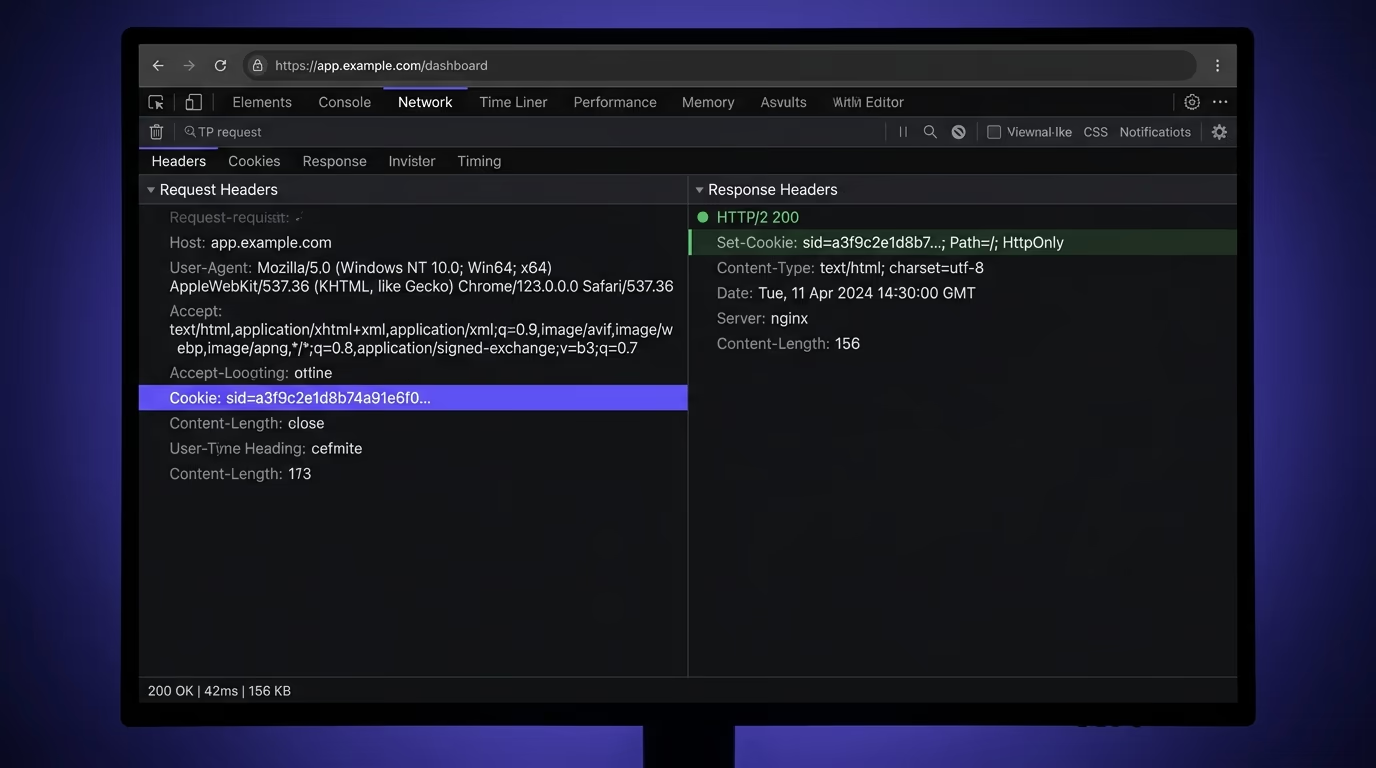
The attack exists because of how HTTP works. HTTP is a stateless protocol, which means the server doesn’t remember who you are between requests. To keep you logged in after you authenticate, the server creates a session and gives your browser a token (usually a cookie) that acts as proof of identity for every subsequent request. Your browser sends that cookie with every request, and the server uses it to look up your session and load your user data.
That cookie is the entire proof of identity. There’s no secondary verification on each request and no re-check of the password. If someone else gets your cookie value and sends it in their own request, the server gives them your account. This is why session hijacking bypasses MFA: the MFA check happened during login, and the cookie was issued after it passed. The attacker doesn’t replay the login, so they never encounter the MFA prompt.
Session tokens can be stored in cookies, in localStorage, or in URL parameters. Cookies are by far the most common for server-side sessions, and they’re the primary target for hijacking. JWTs stored in localStorage are vulnerable to different attacks (mainly XSS), but the core idea is the same: steal the token, become the user.
How does a session hijacking attack work?
A session hijacking attack follows three steps, and none of them require deep technical skill. The attacker identifies a target, obtains the session token through one of several techniques, and then replays that token to the server.
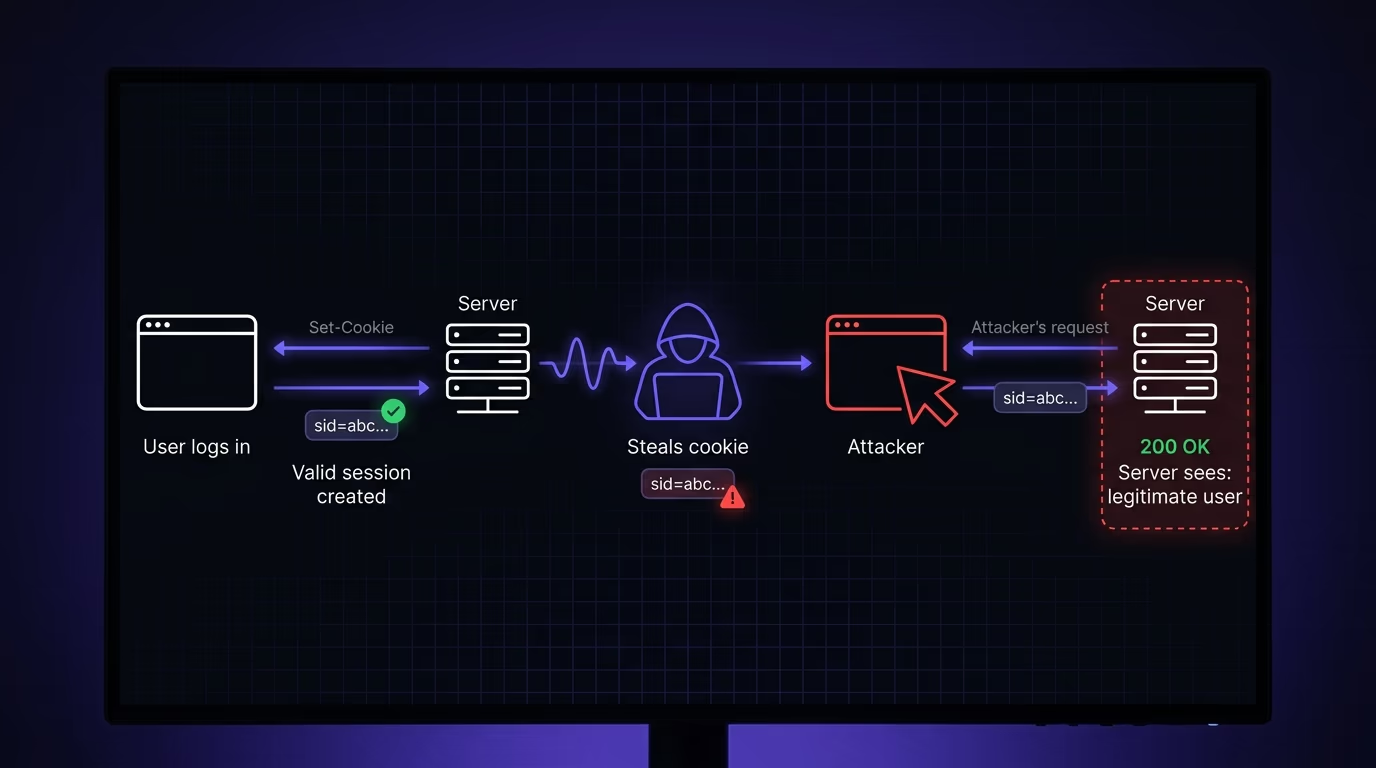
In the first step, the user logs in normally. They enter their email and password, complete their MFA challenge, and the server creates a session. The server sends back a Set-Cookie header with a session ID (something like session=abc123def456), and the browser stores it.
In the second step, the attacker obtains that cookie value. This is where the different hijacking techniques come in (the next section covers each one). The attacker might sniff it off an unencrypted network, steal it through an XSS vulnerability in your app, set it before the user logs in through session fixation, or intercept it with a phishing proxy that sits between the user and your server.
In the third step, the attacker pastes the stolen cookie value into their own browser (or sends it with curl, Postman, or a script). The server receives a request with a valid session token, looks up the session, finds a logged-in user, and serves the response. From the server’s perspective, this request looks identical to one from the real user. There’s no alarm and no re-authentication prompt.
The entire attack takes seconds once the token is obtained. And because the attacker never touches the login page, there’s no failed-login log entry and no credential-based alert. Your existing security headers can help if they’re configured correctly, but only specific cookie flags and session management practices actually stop the attack.
What are the most common session hijacking techniques?
There are five techniques that cover the majority of real-world session hijacking attacks. Each one targets a different weakness, and each has a specific defense.
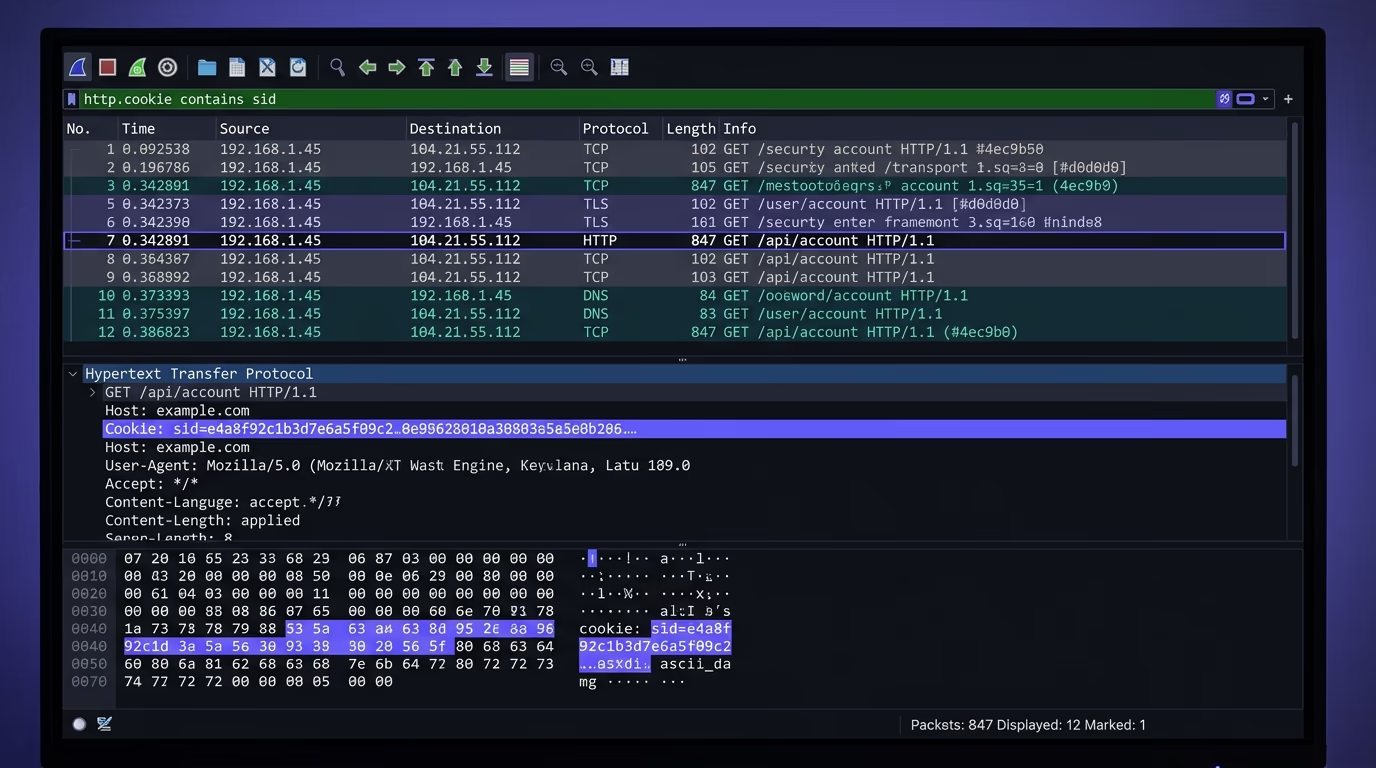
Session sniffing is the oldest method. When your app serves any page or API call over plain HTTP (not HTTPS), the session cookie travels across the network in plain text. An attacker on the same Wi-Fi network (a coffee shop, an airport, a hotel) captures packets with a tool like Wireshark and reads the cookie value directly. The fix is straightforward: enforce HTTPS everywhere and set the Secure flag on your cookies so the browser refuses to send them over unencrypted connections.
Cross-site scripting (XSS) is the most common technique in modern apps. If your application has an XSS vulnerability (an input field that renders user-supplied HTML or JavaScript without sanitization), an attacker injects a script that reads document.cookie and sends the value to their own server. That one line of JavaScript gives them every cookie that isn’t protected by the HttpOnly flag. You can read more about how injection vulnerabilities work in the article on SQL injection prevention, since the root cause (unvalidated user input) is the same.
Session fixation works differently from the others. Instead of stealing an existing token, the attacker creates a session first, then tricks the victim into authenticating with that session ID. The attacker sends a link like https://yourapp.com/login?session=attacker-chosen-id. The victim clicks it, logs in, and the server attaches the user’s account to the session ID the attacker already knows. The defense is regenerating the session ID immediately after every successful login, so any pre-set ID becomes invalid.
Adversary-in-the-middle attacks use phishing proxies like Evilginx or Modlishka. The attacker sets up a server that looks exactly like your login page, forwards the user’s credentials to the real server in real time, and intercepts the session cookie that comes back. This bypasses MFA completely because the real server sees a legitimate login with a valid MFA code. The attacker’s proxy just copies the session cookie before passing the response to the victim. The defense against this one is harder: token binding, device fingerprinting, and monitoring for impossible-travel logins are the main tools.
Infostealers (malware like Redline, Raccoon, or Lumma) run on the victim’s machine and export all browser cookies from the local cookie store. This gives the attacker every session for every site the user is logged into. There’s no application-level fix for this one because the malware has the same access as the user’s browser, but short session timeouts and session-binding techniques limit how long a stolen token remains useful.
How does AI-generated code make sessions vulnerable?
AI code generators produce session handling that works but doesn’t defend. The code logs users in, creates sessions, and serves authenticated pages correctly. The problem is that the default configuration of every session library is optimized for convenience during development, not security in production, and AI models almost never change the defaults.
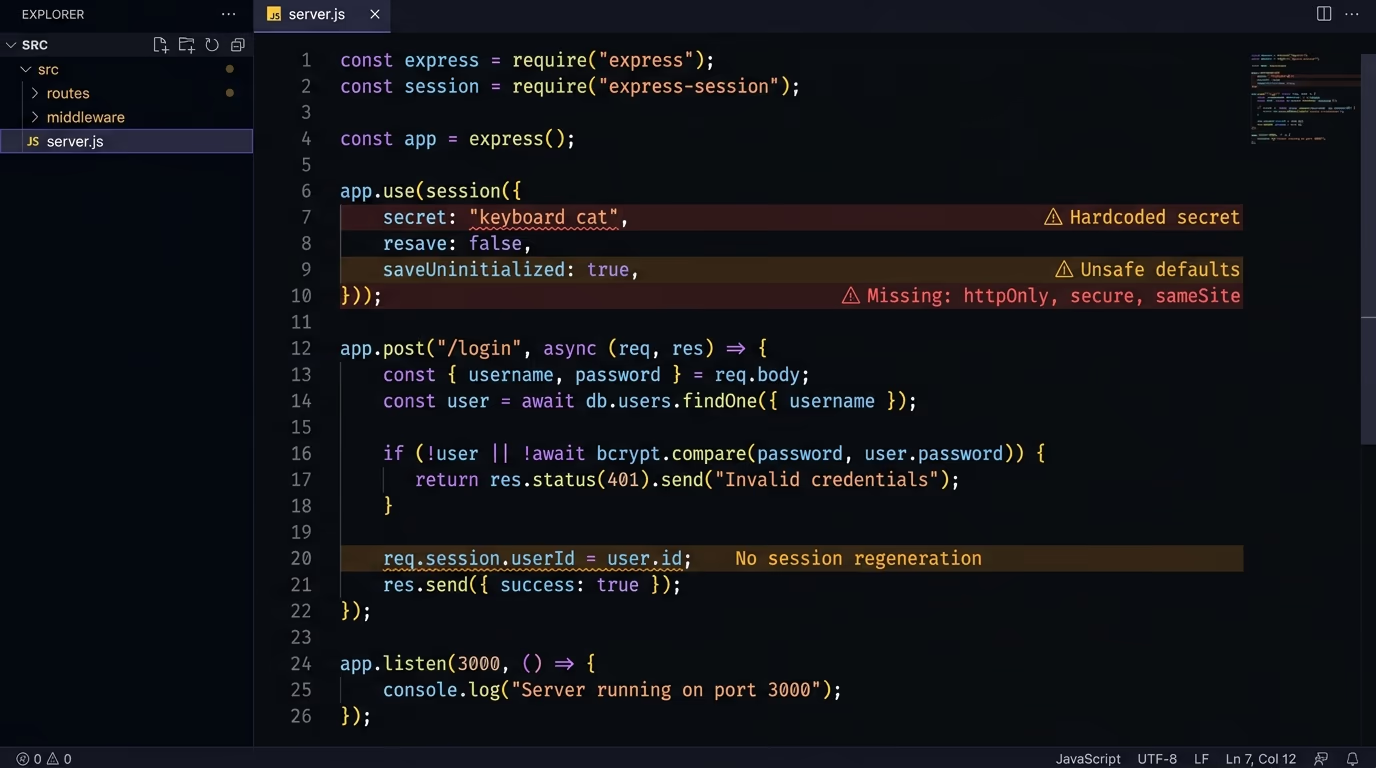
Ask Cursor or Copilot to “add session-based auth to this Express app” and you’ll get something like app.use(session({ secret: 'keyboard cat' })). That single line creates a working session system, but it uses a hardcoded secret, sets no Secure flag, leaves SameSite at whatever the library default is, and doesn’t regenerate the session ID after login. Every technique described in the previous section works against this configuration.
The pattern is identical to the IDOR vulnerability problem: the generated code satisfies the functional requirement (the user can log in and stay logged in) but ignores the security requirement (the session should resist theft). A missing HttpOnly flag doesn’t cause an error. An absent SameSite attribute doesn’t break any test. A session that never expires works perfectly until someone steals it.
Vibe-coded apps built with tools like Lovable, Bolt, or v0 inherit this pattern at a larger scale. These tools generate full authentication flows in seconds, and the developer typically tests them once (log in, confirm it works, move on) without inspecting the cookie configuration. The broader pattern of vibe coding security risks applies directly here: the code runs, the product ships, and the session cookies are wide open.
Three specific defaults cause the most damage. First, session IDs that don’t regenerate after login, which makes session fixation trivial. Second, cookies without HttpOnly, which means any XSS vulnerability on any page can steal the session. Third, missing SameSite attributes, which leaves the door open for cross-site request forgery and some fixation variants. Any one of these is fixable in a single line of configuration, but AI doesn’t write that line.
Which cookie flags stop session hijacking?
Three cookie attributes do most of the work, and they cost nothing to implement. Every session cookie on every application should have all three set. If you skip even one, you leave a specific attack vector open. The same three flags, along with the __Host- prefix, are covered in depth in the guide to cookie security flags.
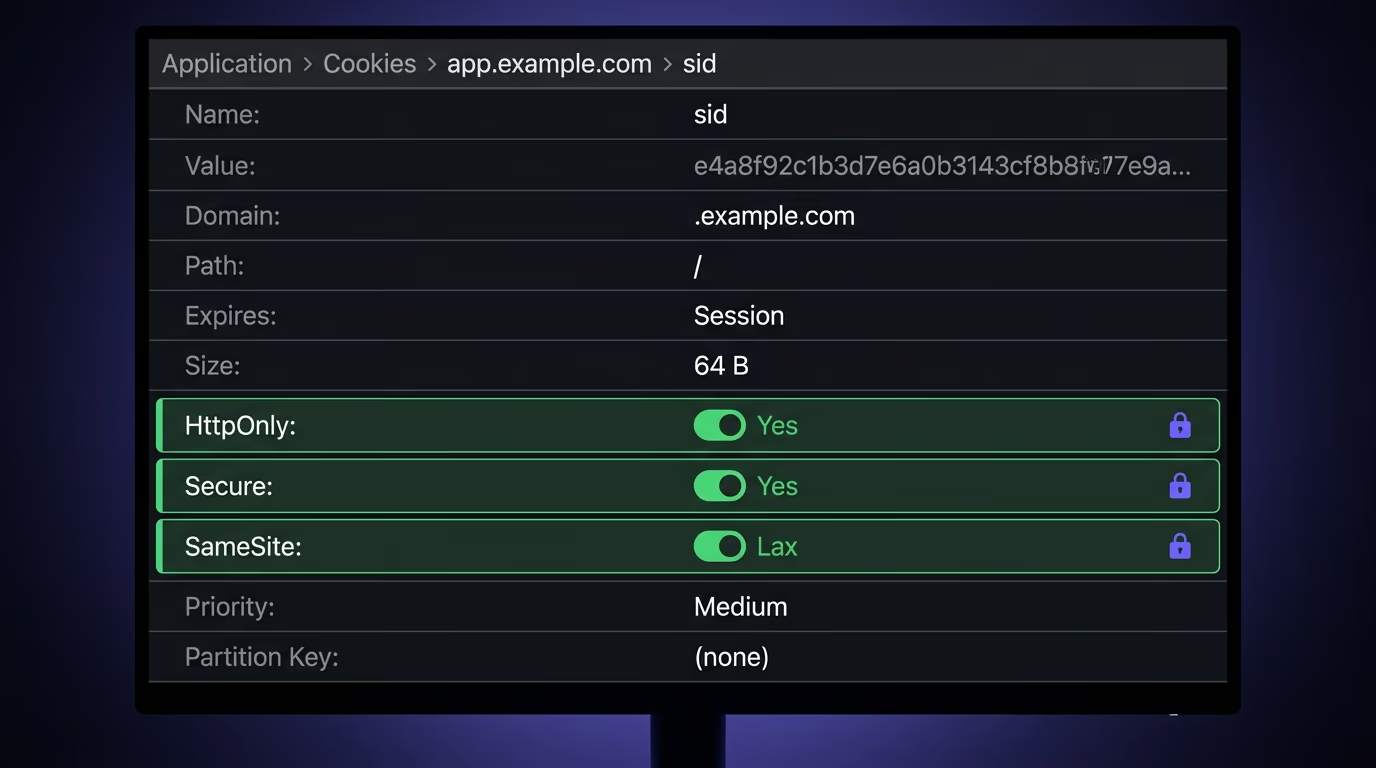
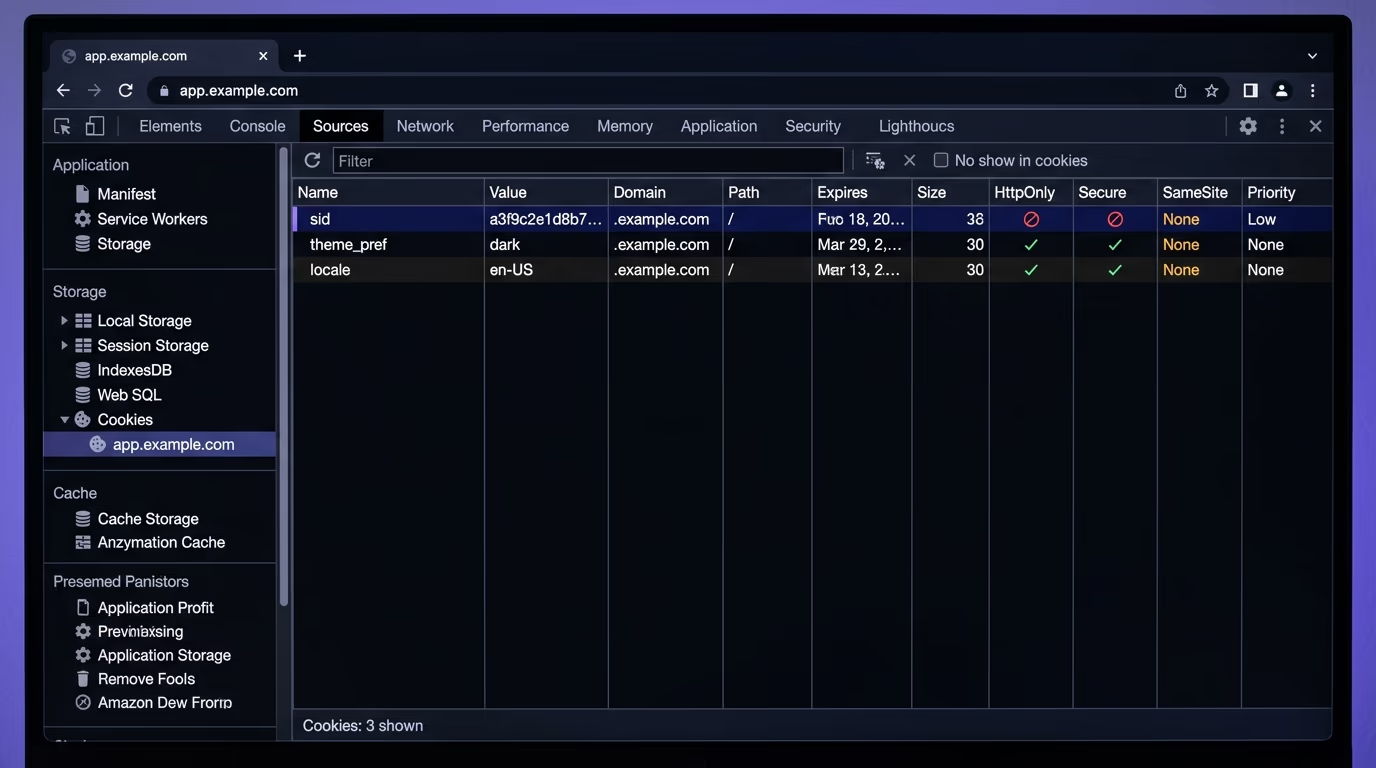
HttpOnly prevents JavaScript from reading the cookie. When you set this flag, document.cookie returns nothing for that cookie, and any XSS payload that tries to exfiltrate it gets an empty string. This is the single most effective defense against XSS-based session theft. It doesn’t prevent XSS itself (the attacker can still execute scripts), but it makes the cookie invisible to those scripts. Without HttpOnly, a single reflected or stored XSS vulnerability on any page of your app can steal every user’s session.
Secure ensures the cookie is only sent over HTTPS connections. If a user’s browser somehow connects over plain HTTP (a redirect issue, a misconfigured CDN, a network downgrade attack), the Secure flag tells the browser to withhold the cookie entirely. This blocks session sniffing on unencrypted connections. Combined with HSTS (HTTP Strict Transport Security, which your security headers should already include), this makes network-level cookie interception effectively impossible.
SameSite controls when the browser attaches the cookie to cross-origin requests. It accepts three values. Strict means the cookie is never sent on any cross-origin request, which is the safest option but can break legitimate flows like clicking a link to your site from an email. Lax sends the cookie on top-level navigations (clicking a link) but not on cross-origin POST requests, subresource requests, or iframes. None disables the protection entirely and requires the Secure flag. For session cookies, Lax is the right default for most apps, and Strict is correct for apps that don’t need to work from external links.
Beyond these three, you should also set Path=/ (usually the default) and a reasonable Max-Age or Expires value. Sessions that live forever give attackers an unlimited window to use a stolen cookie. A 15 to 30-minute inactivity timeout, combined with an absolute maximum session duration (24 hours is common), limits the damage even if a token does get stolen.
How do you secure sessions in Next.js and Express?
The fix is configuration, not architecture. Both Next.js and Express have well-supported session libraries that accept the right flags as options. You just have to set them.
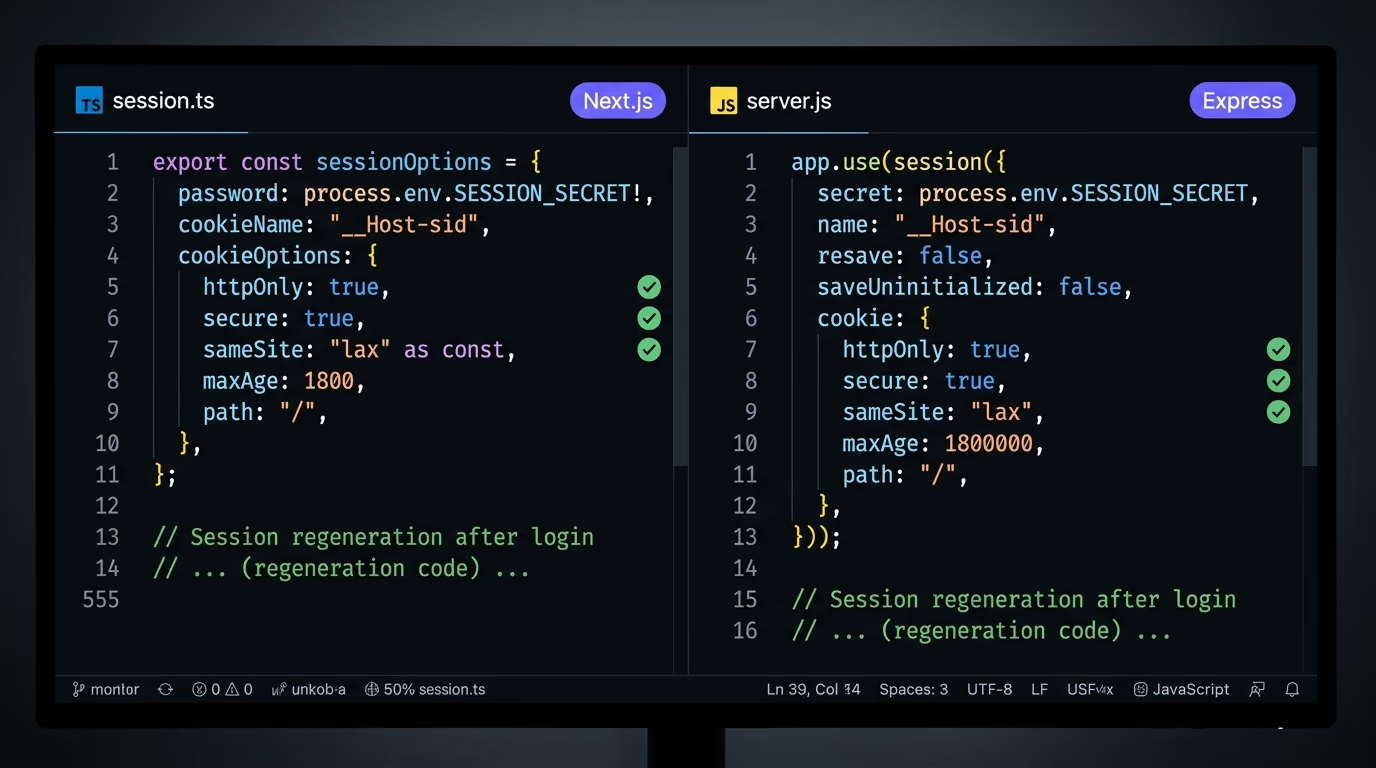
In Express with express-session, the fix looks like this:
app.use(session({
  secret: process.env.SESSION_SECRET,
  name: '__Host-sid',
  resave: false,
  saveUninitialized: false,
  cookie: {
    httpOnly: true,
    secure: true,
    sameSite: 'lax',
    maxAge: 1800000, // 30 minutes
    path: '/',
  },
}));
The __Host- cookie name prefix is a browser-enforced constraint that requires the cookie to be Secure, have Path=/, and not have a Domain attribute. This prevents subdomain attacks where an attacker on evil.sub.yourapp.com could set a cookie for .yourapp.com.
Session regeneration after login is the other half of the fix. After the user authenticates, call req.session.regenerate() to create a new session ID and destroy the old one. This kills session fixation attacks because any ID the attacker set before login becomes invalid:
req.session.regenerate((err) => {
  req.session.userId = user.id;
  req.session.save();
});
In Next.js, if you’re using a library like iron-session or Better Auth, the approach is similar. Better Auth handles session regeneration on login automatically, but you still need to verify the cookie flags. Check your auth configuration and confirm that httpOnly, secure, and sameSite are all set, and that the session has a reasonable expiration. If you’re building on Next.js and Supabase together, the article on securing a Next.js and Supabase app covers the broader auth configuration, including the Supabase-specific session handling.
For any framework, the checklist is the same. Set HttpOnly, Secure, and SameSite on your session cookie. Regenerate the session ID after login. Set a reasonable session timeout. Use a __Host- prefix if your architecture supports it. Test by opening your browser’s developer tools, going to the Application tab, and checking every flag on your session cookie.
How do you detect a hijacked session?
Detection is the last layer, and it matters because no prevention is perfect. If an attacker does steal a token (through malware, a phishing proxy, or a vulnerability you haven’t patched yet), you want to catch the hijacked session before it does real damage.
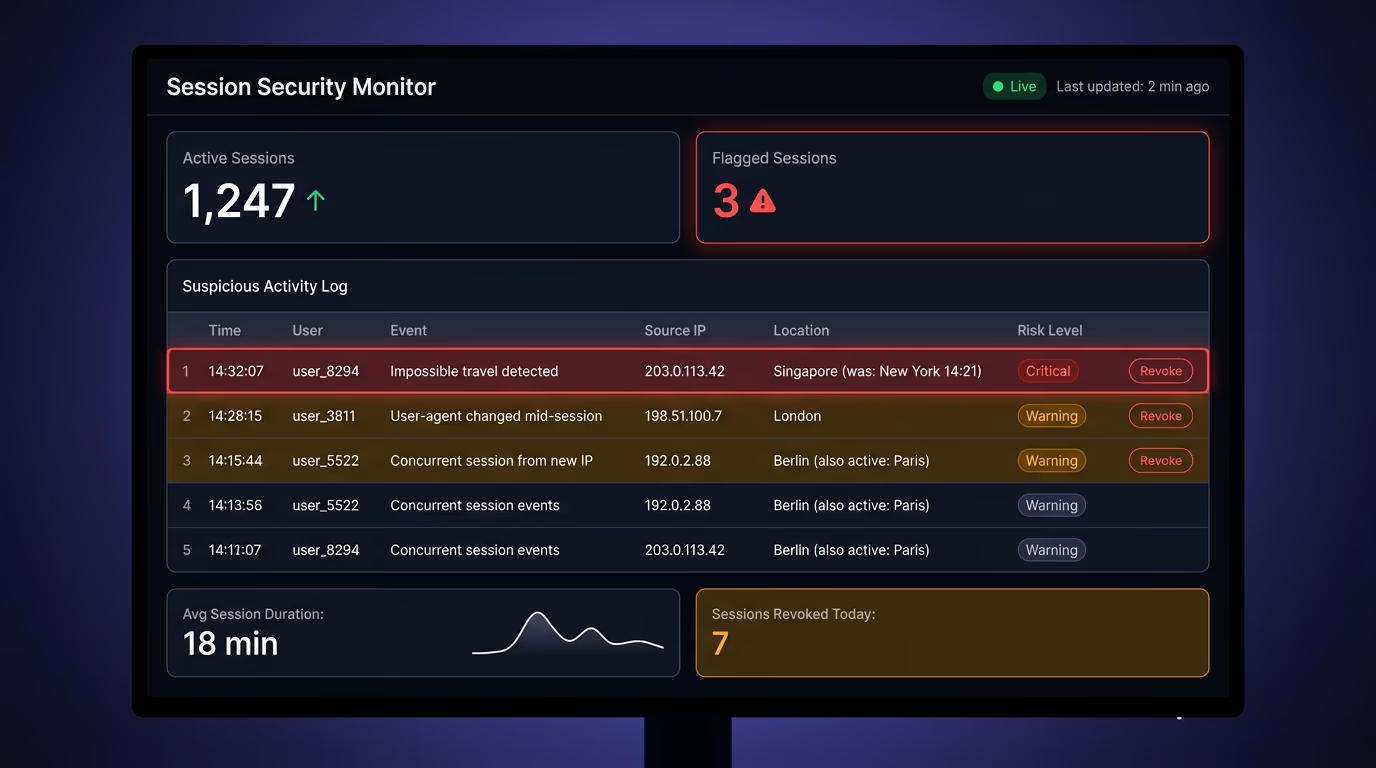
The strongest signal is impossible travel. If a session was active in New York and then appears in Singapore ten minutes later, it’s not the same person. Store the IP address and approximate geolocation at session creation, and flag any request that comes from a location the user couldn’t physically reach since their last request. This isn’t foolproof (VPNs exist, and users do change networks), but a jump across continents within minutes is a strong indicator.
User-agent changes mid-session are another strong signal. If a session started on Chrome 126 on Windows and a request suddenly comes from Firefox on Linux, something happened. Legitimate users don’t change browsers mid-session. Store the user-agent string at session creation and compare it on each request. A mismatch doesn’t necessarily mean hijacking (some proxies rewrite user-agents), but it’s worth flagging.
Concurrent sessions from different IPs are the third indicator. If the same session ID is being used from two different IP addresses at the same time, one of those requests is probably illegitimate. Some applications handle this by invalidating the session entirely when it shows up from a second IP, which forces both the real user and the attacker to re-authenticate. Others flag it for review without disrupting the user.
When you detect a suspicious session, the response should be immediate: invalidate the session on the server side (delete it from your session store), which forces the user to log in again. This costs the legitimate user a minor inconvenience but kills the attacker’s access completely. Log the event with enough detail (IP, user-agent, timestamp, what the session accessed) to investigate later.
Run a security check on your own site
The cookie flags and session settings covered here are exactly what Amabrik’s security scan checks for. It scans your site’s HTTP headers and cookie configuration, flags missing HttpOnly, Secure, and SameSite attributes, and gives you a copy-paste AI fix prompt for each finding that you can hand directly to Claude, ChatGPT, or Cursor.
If you’ve built an app with AI-generated code, or you just haven’t audited your session configuration recently, run the scan and see what comes back. It takes less than a minute and catches the configuration gaps that make session hijacking possible.
Session hijacking is when an attacker steals the session cookie your browser stores after you log in and uses it to impersonate you. The attacker never needs your password or MFA code because the stolen cookie tells the server they're already authenticated. It works because HTTP is stateless, so the server trusts whoever holds the valid session token.
No. MFA protects the login step, but session hijacking happens after login. Once the user completes authentication (password plus MFA code), the server issues a session token. The attacker steals that token, not the credentials, so MFA has already done its job and can't help. That's why cookie security flags and session management matter more than authentication strength against this attack.
The most common signs are unexpected logouts (your session got invalidated because the attacker's request replaced it), unfamiliar devices showing up in your active sessions list, and account changes you didn't make. On the server side, you can detect it by monitoring for impossible-travel logins, sudden user-agent changes mid-session, and concurrent sessions from different IP addresses for the same account.
Session hijacking is the broad category: any method of stealing or taking over an existing session. Session fixation is one specific technique within it. In fixation, the attacker sets a known session ID before the victim logs in (by injecting it via a URL parameter or a cookie), then waits for the victim to authenticate. Since the session ID stays the same after login, the attacker now has a valid authenticated session. The fix is regenerating the session ID immediately after every successful login.
Amabrik's security scan checks your site's HTTP response headers and cookie configuration for the flags that prevent session hijacking: missing HttpOnly, missing Secure, absent SameSite attribute, and HSTS gaps. Each finding comes with a plain-English explanation and a copy-paste AI fix prompt you can hand to Claude, ChatGPT, or Cursor. It won't simulate an actual hijacking attempt, but it catches the configuration gaps that make one possible.
Three flags do the heavy lifting. HttpOnly blocks JavaScript from reading the cookie, which shuts down XSS-based cookie theft. Secure ensures the cookie only travels over HTTPS, which prevents sniffing on unencrypted connections. SameSite (set to Lax or Strict) stops the browser from sending the cookie with cross-origin requests, which blocks CSRF and many fixation attacks. All three should be set on every session cookie.