SPF, DKIM, DMARC: Stop Email Spoofing
SPF, DKIM, and DMARC are the DNS records that stop anyone spoofing email from your domain. What each one does, and how to set them up right.

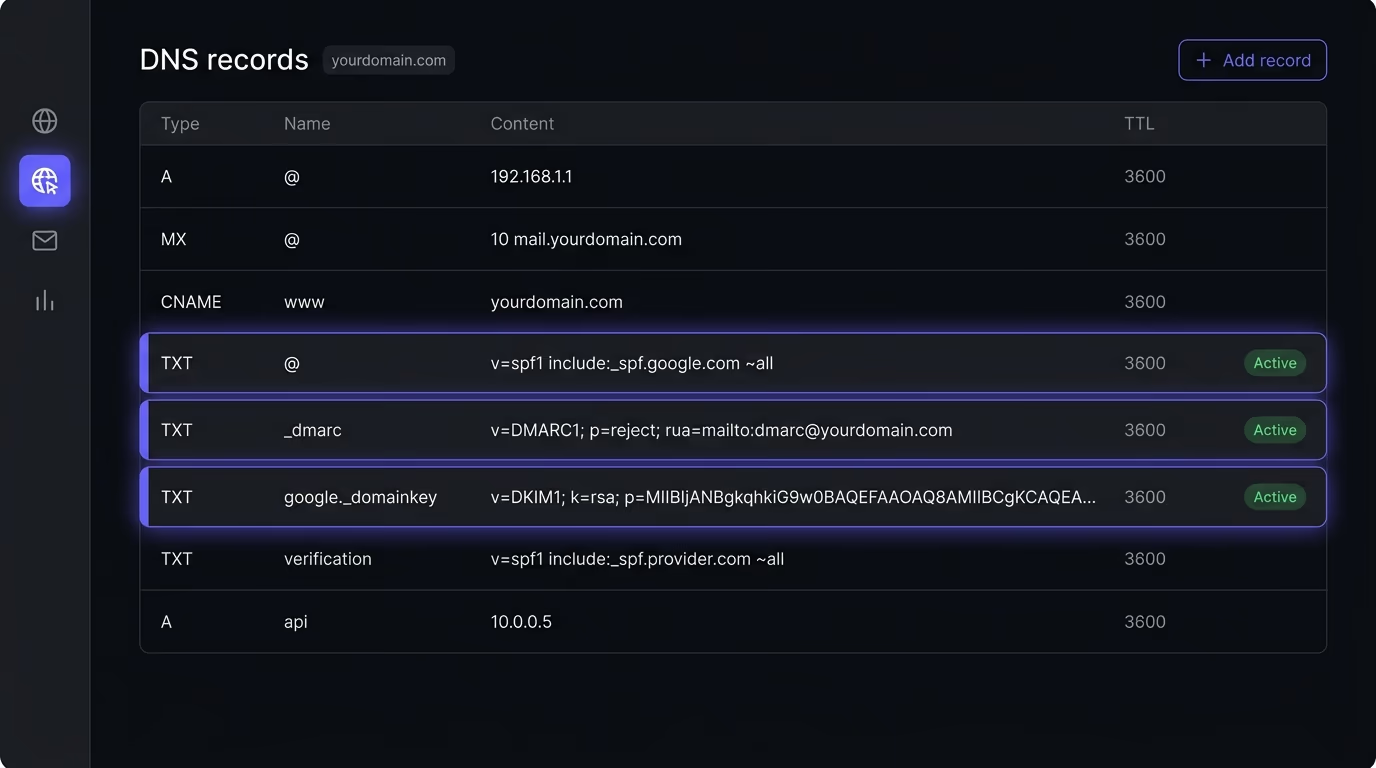
SPF, DKIM, and DMARC are three DNS records that prove an email really came from your domain, so a stranger can’t send phishing mail in your name. SPF lists the servers allowed to send for you. DKIM adds a cryptographic signature to every message. DMARC ties the two together and tells receiving servers what to do when a message fails. Publish all three at their strict settings, and most spoofed email from your domain gets rejected before it lands in anyone’s inbox.
If you own a domain and send email from it, through Google Workspace, Microsoft 365, a marketing platform, or your own app’s transactional service, someone can forge your From address until you lock it down. The three records that lock it down are SPF, DKIM, and DMARC. This piece explains what each one is, gives you the real record to paste into your DNS, shows the exact order to set them up, and covers the traps that leave a domain wide open even when all three records look finished.
What are SPF, DKIM, and DMARC?
SPF, DKIM, and DMARC are three separate email authentication standards that work as a set, each closing a gap the other two leave behind. None of them is enough on its own, which is why guides keep listing all three together.

SPF stands for Sender Policy Framework, defined in RFC 7208. It’s a public list, published in your DNS, of the mail servers allowed to send email for your domain. When a server receives mail that claims to come from you, it can look up that list and check whether the sending server is on it.
DKIM stands for DomainKeys Identified Mail, defined in RFC 6376. Your mail server adds a cryptographic signature to the header of every message it sends, using a private key only you hold. The matching public key sits in your DNS, so any receiver can verify that the message really came from your setup and wasn’t altered on the way.
DMARC stands for Domain-based Message Authentication, Reporting and Conformance, defined in RFC 7489. It’s the policy layer on top. DMARC tells receiving servers what to do when a message claiming to be from your domain fails both SPF and DKIM, and it asks them to send you reports listing every source sending mail as you. That reporting is how you find both the forgers and the legitimate services you forgot about.
How do SPF, DKIM, and DMARC work together?
When a receiving server gets an email claiming to be from your domain, it runs the checks in order and uses your DMARC policy to decide the outcome. SPF and DKIM each produce a pass or a fail, and DMARC reads those results against the address your recipient actually sees.
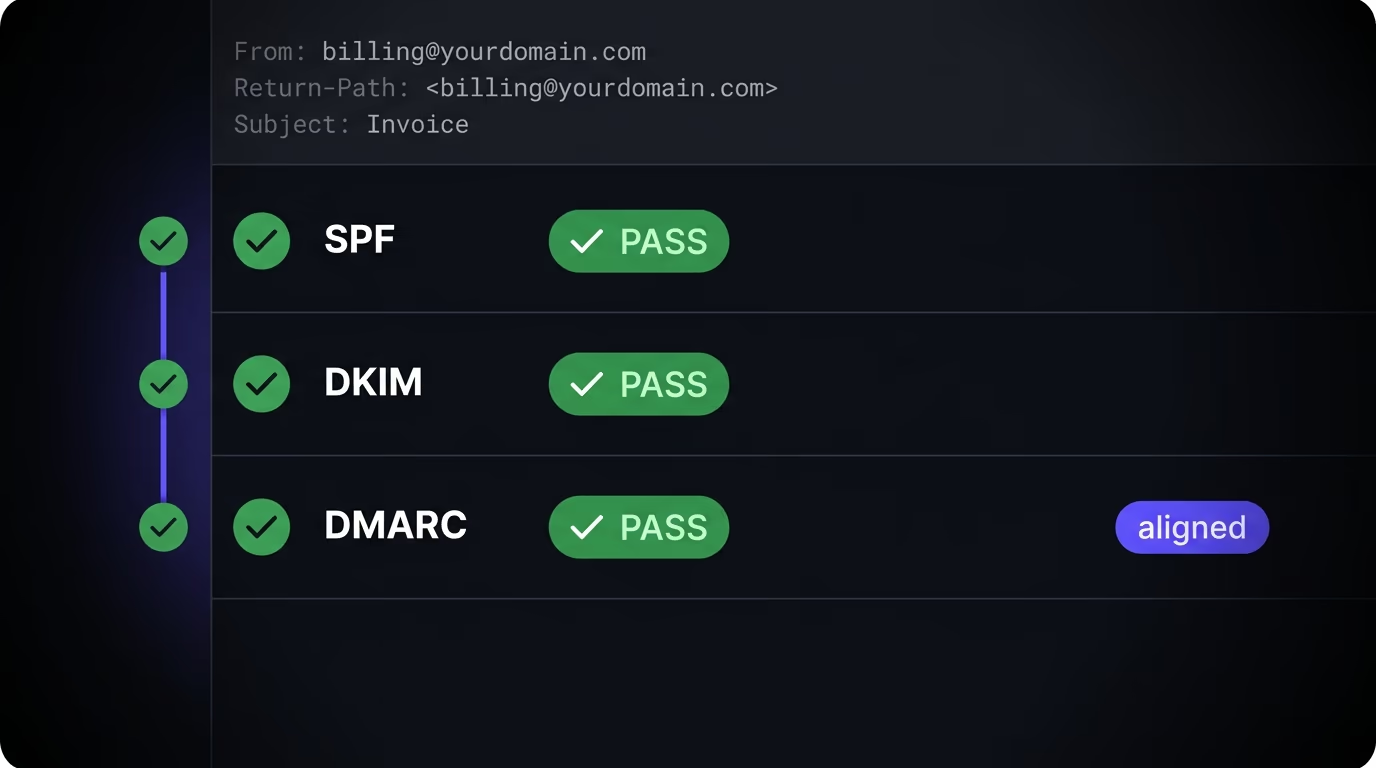
Alignment is what makes DMARC stronger than SPF on its own. SPF checks the hidden envelope sender, the Return-Path, not the From address shown in the inbox. So an attacker can send from a domain they control, pass SPF for that domain, and still stamp your name in the visible From field. DMARC closes that hole by requiring the authenticated domain to match, or align with, the From domain your recipient reads. A message passes DMARC only when SPF or DKIM passes and the domain lines up with the From address.
A real forgery shows how this plays out in practice. An attacker sends a scam invoice from a server they rent, putting your company in the visible From line. Their own SPF might pass for the throwaway domain in the Return-Path, but that domain doesn’t align with your name in the From field, and they can’t produce a valid DKIM signature for you because they don’t hold your private key. DMARC sees no aligned pass, checks your policy, and if you’ve set it to reject, the receiving server drops the message before your customer ever sees it.
That’s why all three matter as a unit. SPF without DMARC checks the wrong address. DKIM without DMARC signs your mail but never tells receivers to reject the unsigned forgeries. DMARC without at least one of the other two has nothing to align against. Set up together, they give a receiving server a clear yes or no and a rule for what to do with a no. Miss one, and you leave a gap the other two structurally can’t cover, the same way a stack of AI-built apps ships with defaults nobody hardened, a pattern I covered in the security risks of vibe coding.
How do you set up an SPF record?
You set up SPF by publishing one TXT record at your domain root that lists every service allowed to send as you, ending with a rule that says what to do with everyone else. Most DNS providers have a dedicated TXT field, and the whole record is a single line.
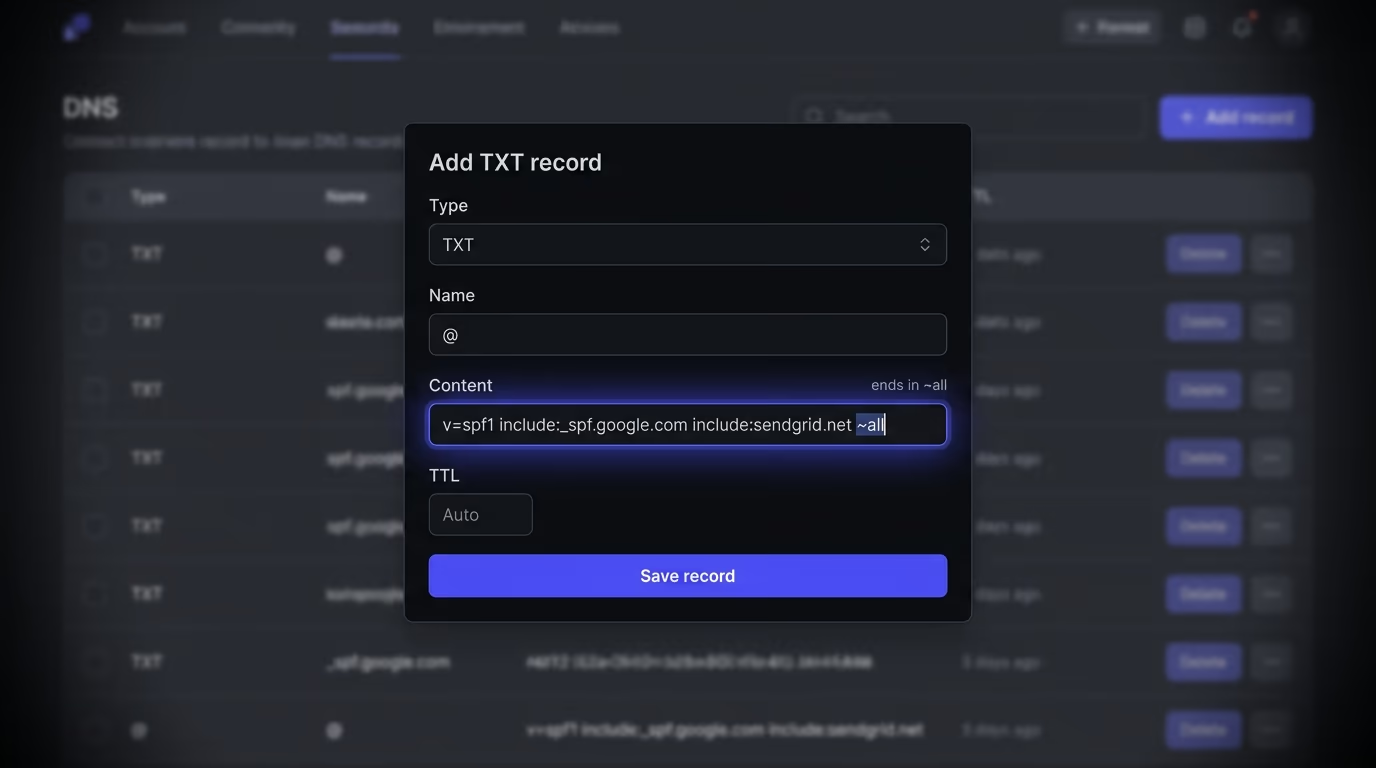
A typical record for a domain sending through Google and a marketing tool looks like this:
v=spf1 include:_spf.google.com include:sendgrid.net ~allEach include pulls in the servers of a service you use, and you add one per provider that sends mail on your behalf. The ending matters more than anything else in the record. -all is a hardfail that tells receivers to reject any server not on the list. ~all is a softfail that tells them to accept the mail but mark it as suspicious. ?all is neutral and enforces nothing. And +all authorizes every server on the internet, which makes the whole record pointless. Use ~all while you confirm you’ve listed every sender, then switch to -all once you’re sure nothing legitimate is missing.
There’s a limit that quietly breaks SPF for busy domains. RFC 7208 caps an SPF check at 10 DNS lookups, and every include, a, mx, redirect, exists, and ptr mechanism counts toward it. Go over ten, and receivers return a PermError, which DMARC reads as an outright fail for your own legitimate mail. So don’t stack a dozen include statements for every tool you’ve ever tried. Remove services you no longer use, and if you genuinely need many senders, flatten the record or use a provider that keeps you under the cap.
How do you set up DKIM?
You set up DKIM in your mail provider’s admin panel, not by writing the record yourself. The provider generates a key pair, keeps the private key, and hands you a public-key record to publish in your DNS under a name called a selector.
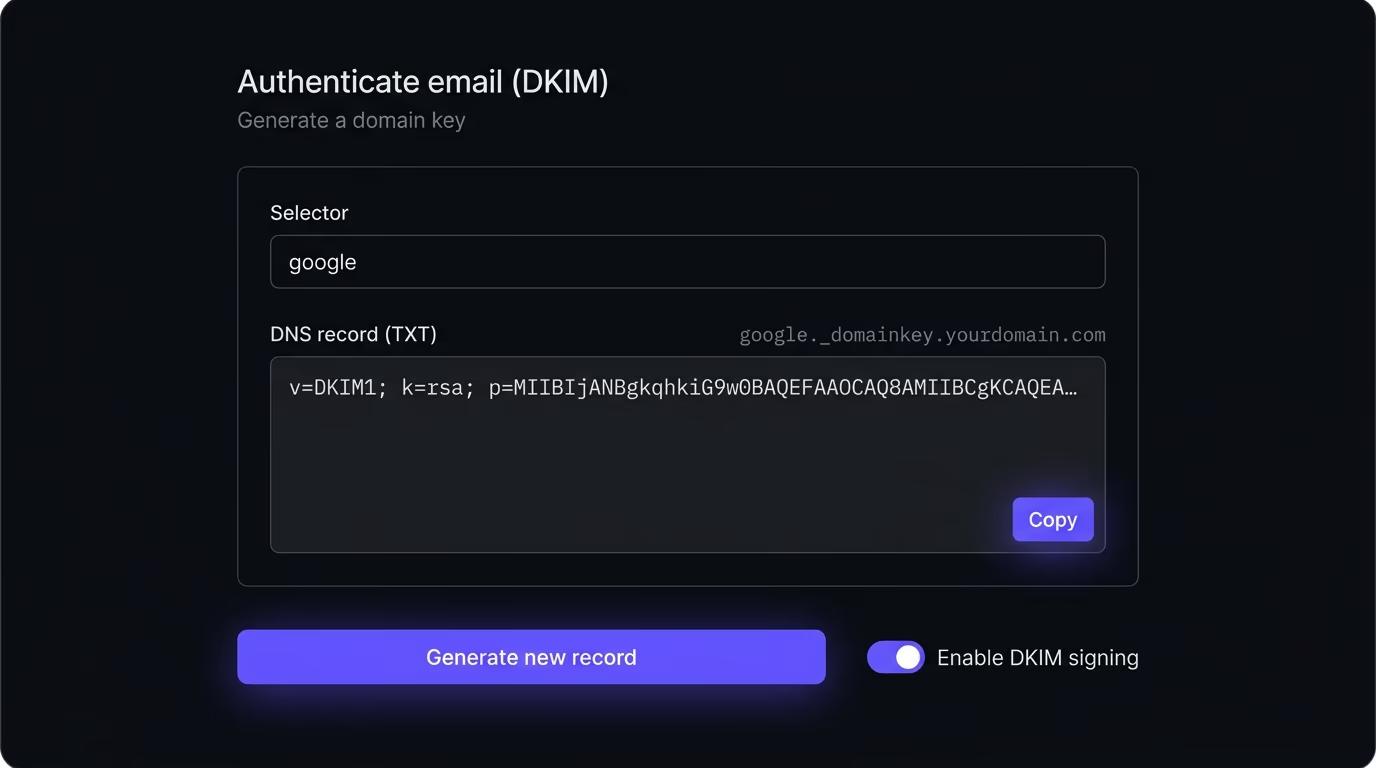
The record lives at selector._domainkey.yourdomain.com, and the selector is just a label the provider picks so you can rotate keys later. Google uses google, Microsoft 365 uses selector1 and selector2, and tools like Mailchimp or SendGrid use their own like k1 or s1. The published value looks like v=DKIM1; k=rsa; p= followed by a long base64 public key. Once it’s live, your provider signs every outgoing message with the private key, and receivers fetch the public key to verify the signature. Ask for a 2048-bit key if the panel offers a choice, since 1024-bit keys are weak by current standards, and rotate the key every so often so an old leaked one can’t be reused against you.
This selector detail explains a common false alarm. If a checker reports no DKIM on your domain, it usually means the tool probed the wrong selector, not that DKIM is missing. Each provider publishes under its own selector, so you have to check the exact one your sender uses. When you enable DKIM in more than one platform, each gets its own selector, and all of them can coexist. Turn it on everywhere you send from, because an unsigned stream is the easiest one for DMARC to let slip if your SPF alignment ever breaks.
How do you set up DMARC?
You set up DMARC by publishing one TXT record at _dmarc.yourdomain.com that holds a policy and a reporting address. This is the record that actually decides whether forged mail gets blocked, so it’s the one worth getting right.
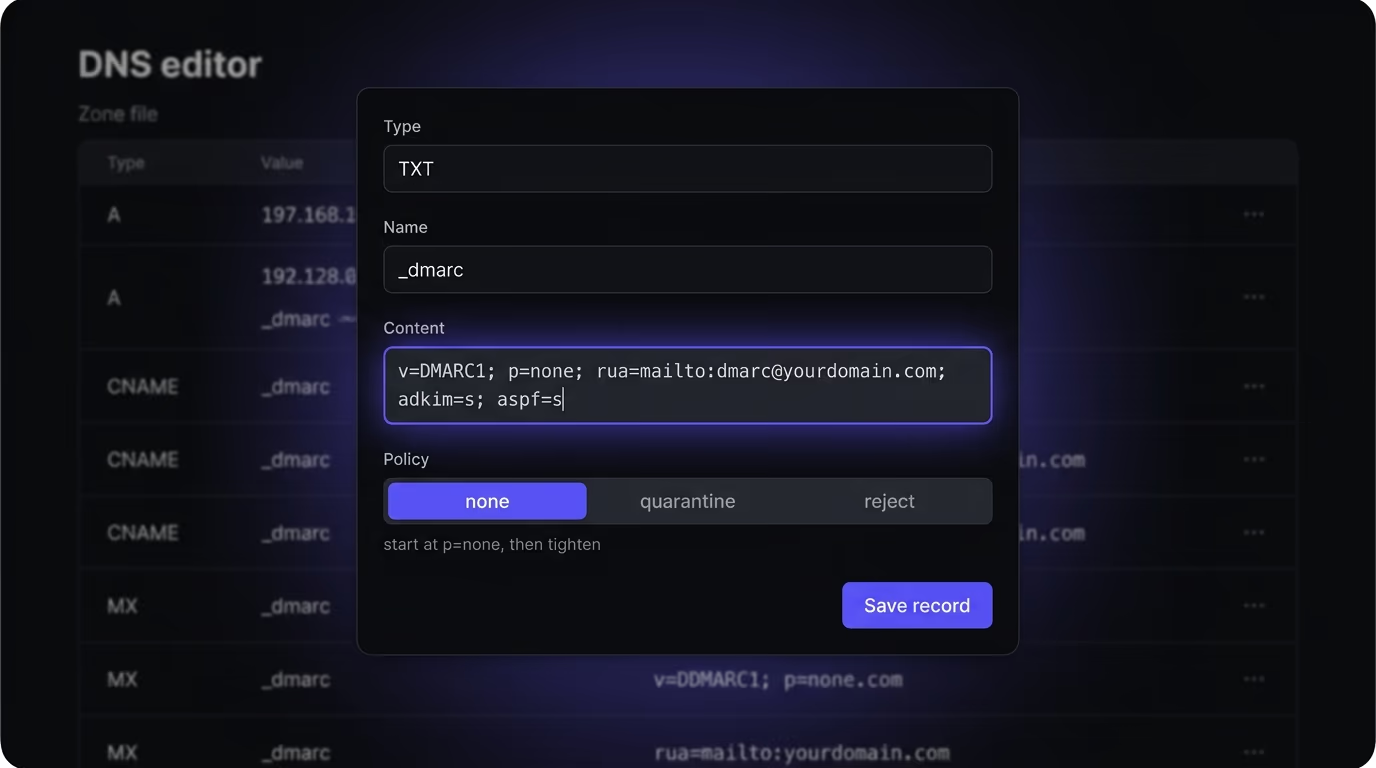
A sensible first record looks like this:
v=DMARC1; p=none; rua=mailto:dmarc@yourdomain.com; adkim=s; aspf=sThe p tag is the policy, and it has three values. p=none monitors and reports without changing delivery. p=quarantine tells receivers to send failing mail to spam. p=reject tells them to block it outright. The rua tag is the address where receivers send the daily aggregate reports, which list every source sending as your domain and whether each one passed. The adkim and aspf tags set alignment to strict (s) or relaxed (r), where strict requires an exact domain match and relaxed allows a subdomain.
Roll it out in stages rather than jumping straight to reject. Publish p=none first, so nothing about your delivery changes while you collect a week or two of reports. Read those reports, find every legitimate service that fails, and fix its SPF or DKIM. Once your real senders all pass cleanly, move the policy to p=quarantine, watch for a few more days, then move to p=reject. Add a subdomain policy with the sp tag if you want subdomains treated differently, and remember that a missing sp means subdomains inherit your main policy.
Why is your domain still spoofable after setup?
A domain with all three records published can still be wide open if those records sit at their weakest settings, which is the most common mistake I see. The records exist, a DNS checker shows green, and the owner assumes the job is done while the domain stays forgeable.
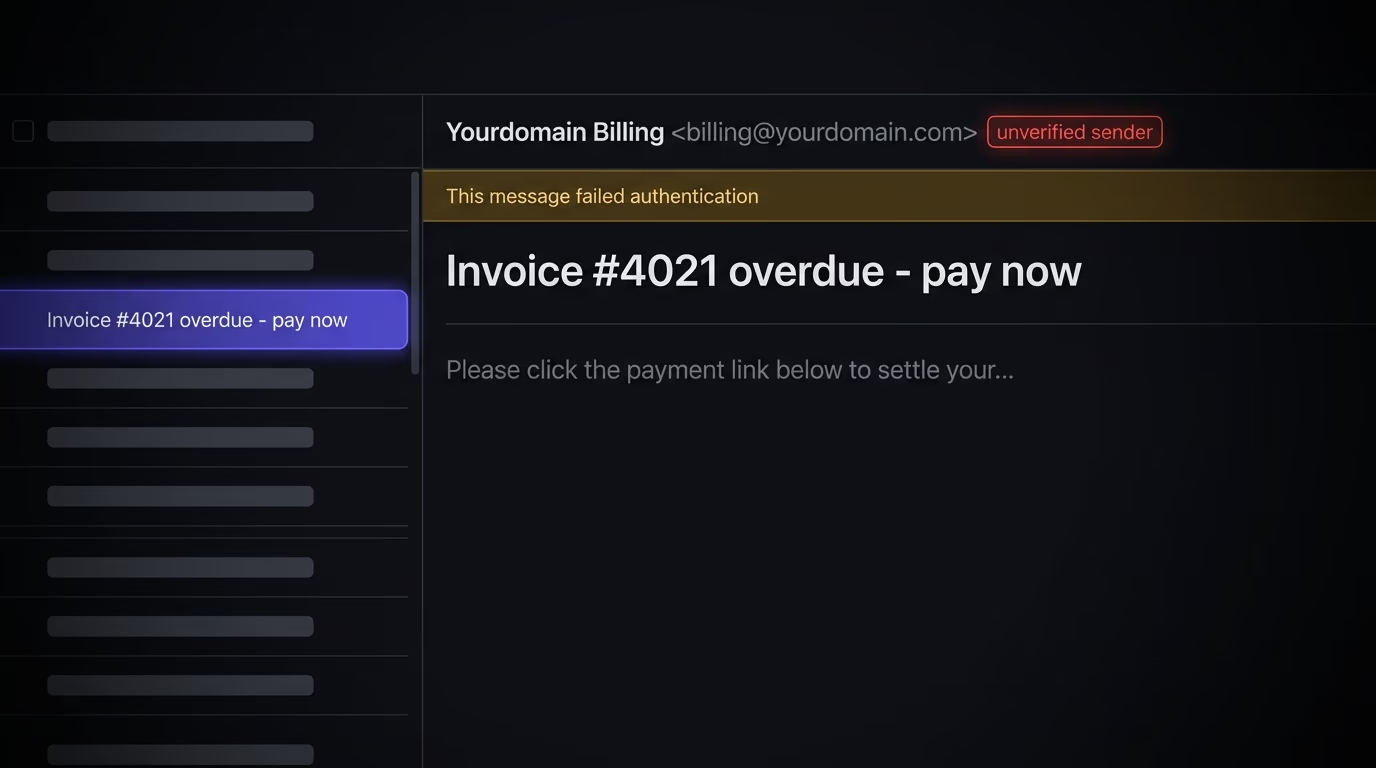
Two settings do most of the damage. An SPF record ending in +all authorizes any server on earth to send as you, so publishing it is the same as having no SPF at all. And a DMARC record left at p=none is monitor-only, which means every spoofed message is dutifully reported to you and then delivered straight to the target anyway. Plenty of domains sit at p=none for years, generating tidy reports nobody reads, fully believing they’re protected. The table below shows how a setup can look finished and still fail.
| Setting | Looks done | What actually happens |
|---|---|---|
SPF ends in +all | A published SPF record | Every server on the internet is authorized, so it blocks nothing |
DMARC at p=none | A published DMARC record | Spoofed mail is reported to you but still delivered to the victim |
| DKIM on unused selector | DKIM shows as enabled | Your active sender is unsigned, so it can’t satisfy DMARC alignment |
| SPF over 10 lookups | A long, thorough record | Receivers return PermError, and DMARC fails your own real mail |
The last row is a trap worth naming on its own. When SPF blows past the 10-lookup limit and starts returning PermError, your legitimate mail begins failing DMARC. The reflex fix is to loosen the policy back to p=none or weaken SPF to ~all, which stops the false failures and quietly reopens the hole you closed. The right fix is to trim the SPF record back under the limit, not to lower the wall. This kind of half-configured security is the theme of our website security checklist, where a control that exists on paper does nothing in practice.
There’s a second reason to finish the job, and it shows up in your open rates. Since February 2024, Gmail and Yahoo require anyone sending roughly 5,000 messages a day or more to personal inboxes to have SPF, DKIM, and a DMARC record at p=none or stronger, with at least one check aligned. As of late 2025 they enforce it with real rejections, so a domain that skips authentication gets hit from both sides: outsiders can spoof it, and its own legitimate mail gets bounced or filtered into spam. The records that stop forgery are now the price of landing in the inbox at all.
How do you check your SPF, DKIM, and DMARC records?
You can read all three from a terminal with dig, or in seconds with a scanner that reads them for you and grades the result. The manual way shows you the raw records, which is worth doing at least once so you know what’s actually published.
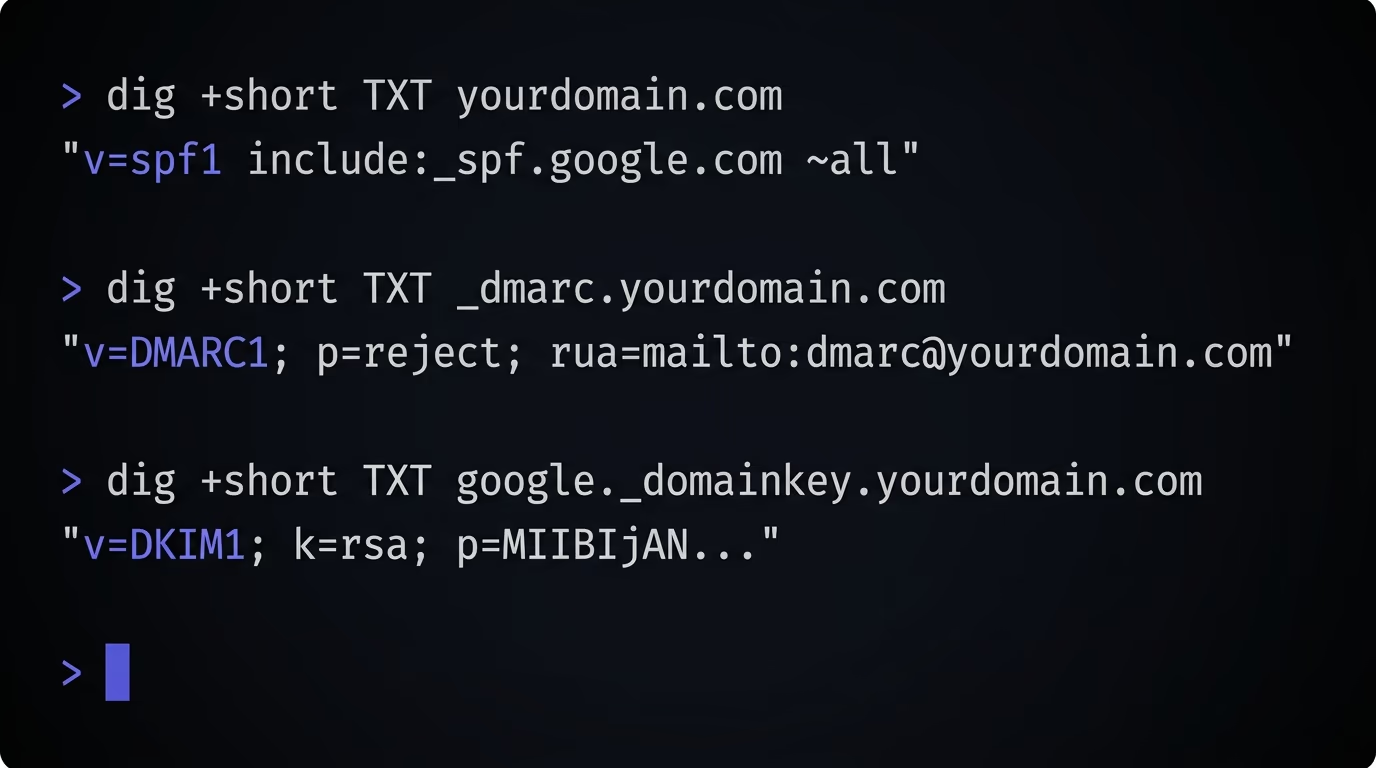
Three commands cover it, one per record. Run dig +short TXT yourdomain.com and look for the line starting with v=spf1. Run dig +short TXT _dmarc.yourdomain.com and look for v=DMARC1. Run dig +short TXT google._domainkey.yourdomain.com for DKIM, swapping google for your provider’s selector. If you’re on Windows, nslookup -type=txt yourdomain.com does the same job. A healthy setup shows an SPF record ending in -all or ~all, a DMARC record at p=quarantine or p=reject with a reporting address, and a DKIM key under the selector your provider uses.
The DMARC reports are where the real work happens, not the records themselves. A day after you publish p=none, receivers start emailing XML aggregate reports to your rua address, and each one lists the servers sending as your domain and whether they passed. Feed those into any free DMARC report reader, and the senders you forgot about show up fast: an old invoicing tool, a helpdesk, a newsletter platform still mailing on your behalf. Fix or list each legitimate one, watch the failures drop to only the forgers, and then you can safely move to p=reject.
Reading raw TXT records gets tedious across a portfolio of domains, and it won’t warn you about the weak settings above. That’s where a scan earns its place. Amabrik’s security scan checks your domain’s DNS and flags a missing SPF record, a +all that neuters it, a missing or p=none DMARC, and the absence of DKIM on the common selectors, each written in plain English with a copy-paste fix prompt you can hand to Claude, ChatGPT, or Cursor. It’s the same crawl that catches the other quiet gaps AI-built sites ship with, like the ones in our guide to securing a Next.js and Supabase app, so one run covers your email records and your web headers at once.
Lock your domain before someone sends mail as you
Email authentication is one of those jobs that costs an afternoon and pays off every time an attacker tries to wear your name. The order never changes, so run it top to bottom. Publish an SPF record that lists your real senders and ends in ~all, then tighten it to -all. Turn on DKIM in every platform you send from, checking each one’s own selector. Publish a DMARC record at p=none, read the reports for a couple of weeks, fix the senders that fail, then ramp the policy to p=quarantine and finally p=reject.
The trap to avoid is stopping halfway and calling it done. A +all SPF, a p=none DMARC, or a DKIM record on a selector you don’t use all show up green in a naive checker while leaving your domain as spoofable as the day you started. So verify the settings, not just their presence. Run Amabrik’s security scan against your domain to see exactly where your SPF, DKIM, and DMARC stand today, and to catch the exposed keys, missing security headers, and open databases that the same AI assistants leave behind alongside them.
They're three DNS records that prove an email really came from your domain. SPF is a public list of the servers allowed to send mail for you. DKIM is a cryptographic signature your mail server stamps onto each message, which receivers verify against a public key in your DNS. DMARC is the policy that tells receiving servers what to do when a message claiming to be from your domain fails both checks, and it emails you reports on who is sending as you. Together they stop most forged email before it reaches an inbox.
Yes, because each one covers a gap the others leave open. SPF alone only checks the hidden envelope sender, so an attacker can pass SPF and still forge the visible From address. DKIM alone signs the message but doesn't tell receivers to reject unsigned forgeries. DMARC is what ties SPF and DKIM to the address your recipients actually see and sets the reject policy. Skip any one of them and your domain stays spoofable in a way the other two can't catch.
The usual reason is that the records are published at their weakest settings. An SPF record ending in +all authorizes every server on the internet, so it gives zero protection. A DMARC record set to p=none is monitor-only, which means spoofed mail is reported to you but still delivered to the target. Both look done in a DNS editor and both leave the door open. You have to end SPF with -all or ~all and move DMARC past p=none to p=quarantine or p=reject before anything is actually blocked.
Start with p=none and a reporting address, leave it there for a couple of weeks, then tighten it. p=none changes nothing about delivery, so it's safe to publish while you read the reports and find every legitimate service that sends as you. Once your real senders all pass, move to p=quarantine, which sends failing mail to spam, then to p=reject, which blocks it outright. Reject is the only policy that fully stops spoofing, so p=none is a starting line, not the finish.
You can read all three from a terminal with dig. Run dig +short TXT yourdomain.com for SPF, dig +short TXT _dmarc.yourdomain.com for DMARC, and dig +short TXT google._domainkey.yourdomain.com for DKIM, swapping google for your provider's selector. If you'd rather not read raw records, a scanner does it in seconds and grades the result. Amabrik's security scan checks all three and flags a missing record, a +all SPF, or a p=none DMARC in plain English with a copy-paste fix.
They help, because mailbox providers treat authenticated mail as more trustworthy and unauthenticated mail as suspect. Gmail and Yahoo now require SPF, DKIM, and DMARC for anyone sending in bulk, so without them your mail is more likely to be filtered or rejected. Passing all three doesn't guarantee the inbox on its own, since content, reputation, and list hygiene still matter, but failing them is one of the fastest ways to land in spam.