Website Security Checklist: Scan Before Launch
Website security checklist with the checks most sites skip: exposed keys, missing headers, open databases, email spoofing, and how to scan for them.

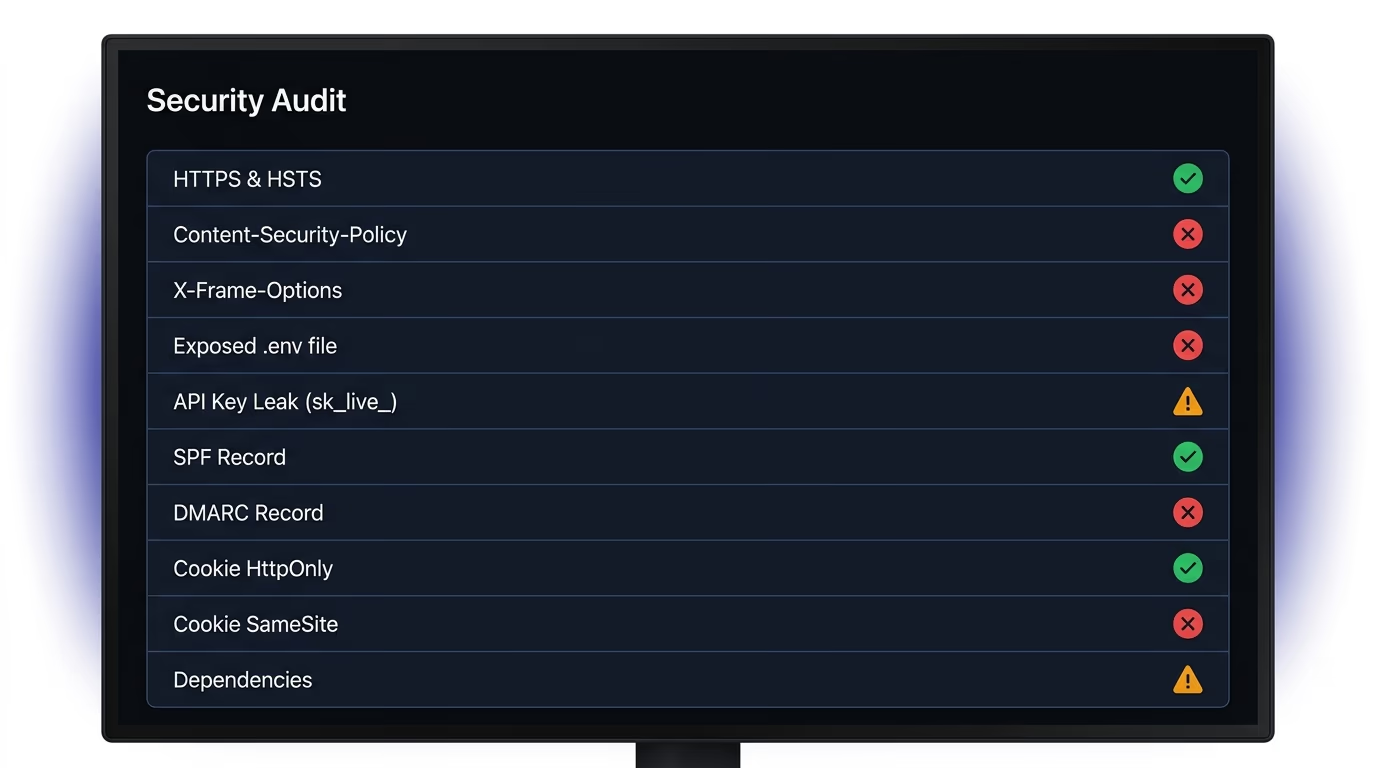
A useful website security checklist goes beyond HTTPS certificates. It covers security headers that most sites skip entirely, checks for API keys sitting in client-side code, verifies that databases enforce access rules, confirms email authentication records exist, and makes sure cookies carry the right security flags. Most checklists online stop at SSL and a firewall, which leaves exactly the holes that modern sites, especially ones built with AI coding tools, actually ship with.
This guide covers the checks that existing lists consistently leave out, with a clear way to test each one on your own site right now.
Why do most websites fail a basic security check?
The security checklists that rank on the first page of Google were written for a previous generation of web development. They cover SSL certificates, Web Application Firewalls, and SQL injection, because those were the primary risks when everything ran on hand-configured Apache servers. Those checks still matter, but modern hosting platforms handle most of them automatically now: Vercel, Netlify, and Cloudflare all provision TLS certificates without asking, and every mainstream ORM parameterizes database queries by default.
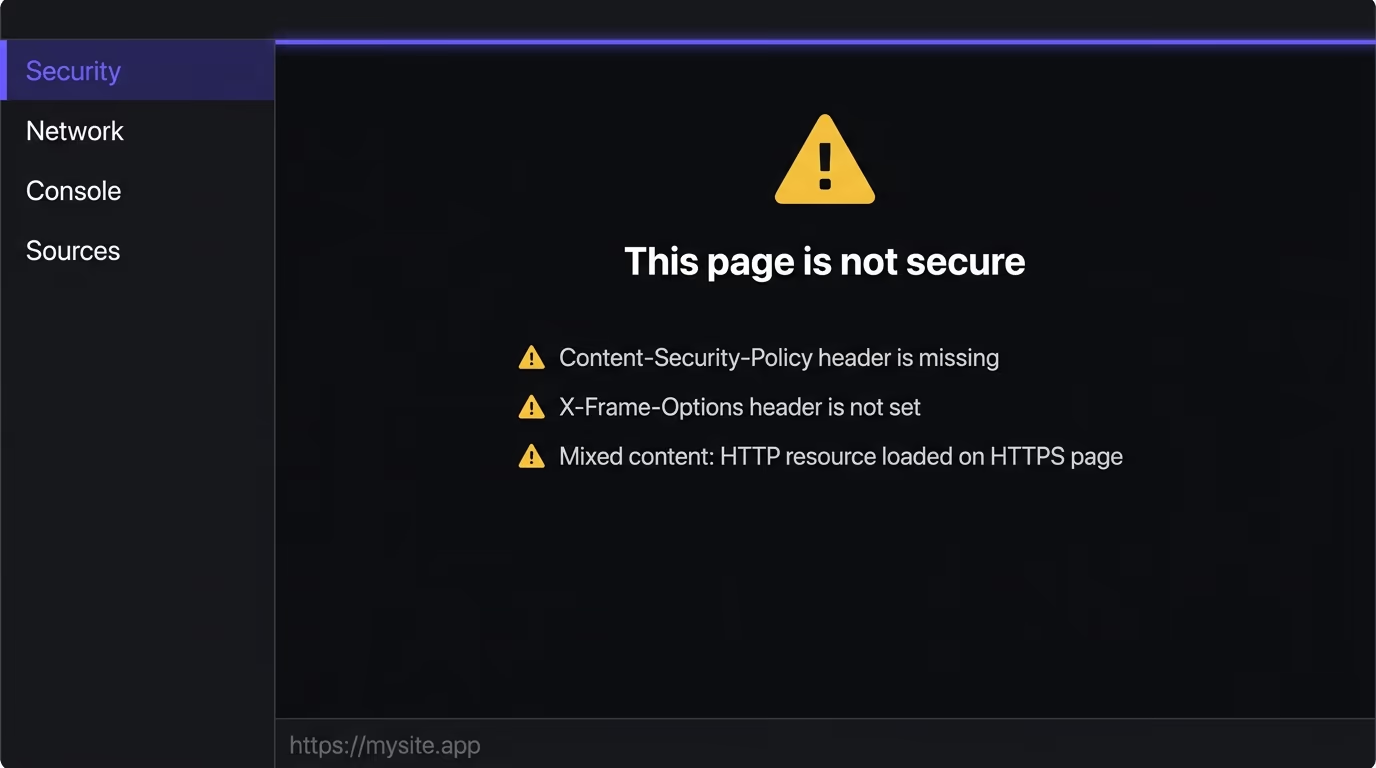
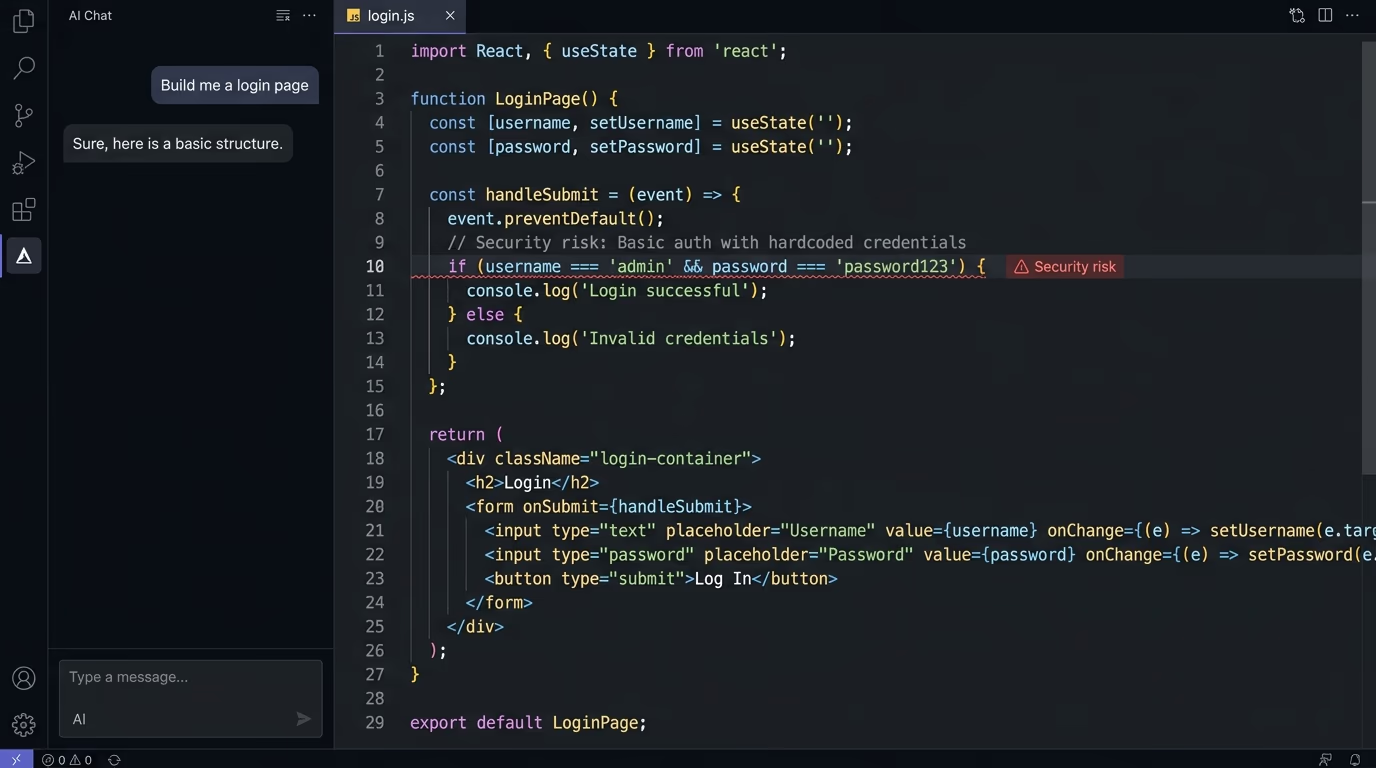
The vulnerabilities that keep showing up in 2026 look different. Sites leak API keys in client-side JavaScript because an AI coding tool stored them in the wrong environment variable. Databases run with zero access rules because the default was “off” and nobody changed it. Every security header except HSTS is absent because the deployment platform doesn’t add them and the developer never thought to. Domains send email with no authentication records in DNS, which means anyone on the internet can send mail pretending to be from that domain.
If you built your site with Cursor, Lovable, Bolt, v0, or another AI coding tool, the risks are especially concentrated, because these tools produce code that works without making it safe. But the same gaps appear just as often on hand-coded sites, WordPress installs, and hosted platforms like Shopify or Squarespace. The checklist below catches all of them.
Does your site enforce HTTPS and HSTS?
HTTPS encrypts traffic between your visitors and your server so nobody on the same network can read or tamper with it. Most hosting providers issue TLS certificates automatically through Let’s Encrypt or their own certificate authority, so your site probably has HTTPS already. The more common failure today is mixed content, where your HTTPS page loads an image, font, or script over plain HTTP, which breaks encryption for that resource and triggers browser warnings that erode trust.
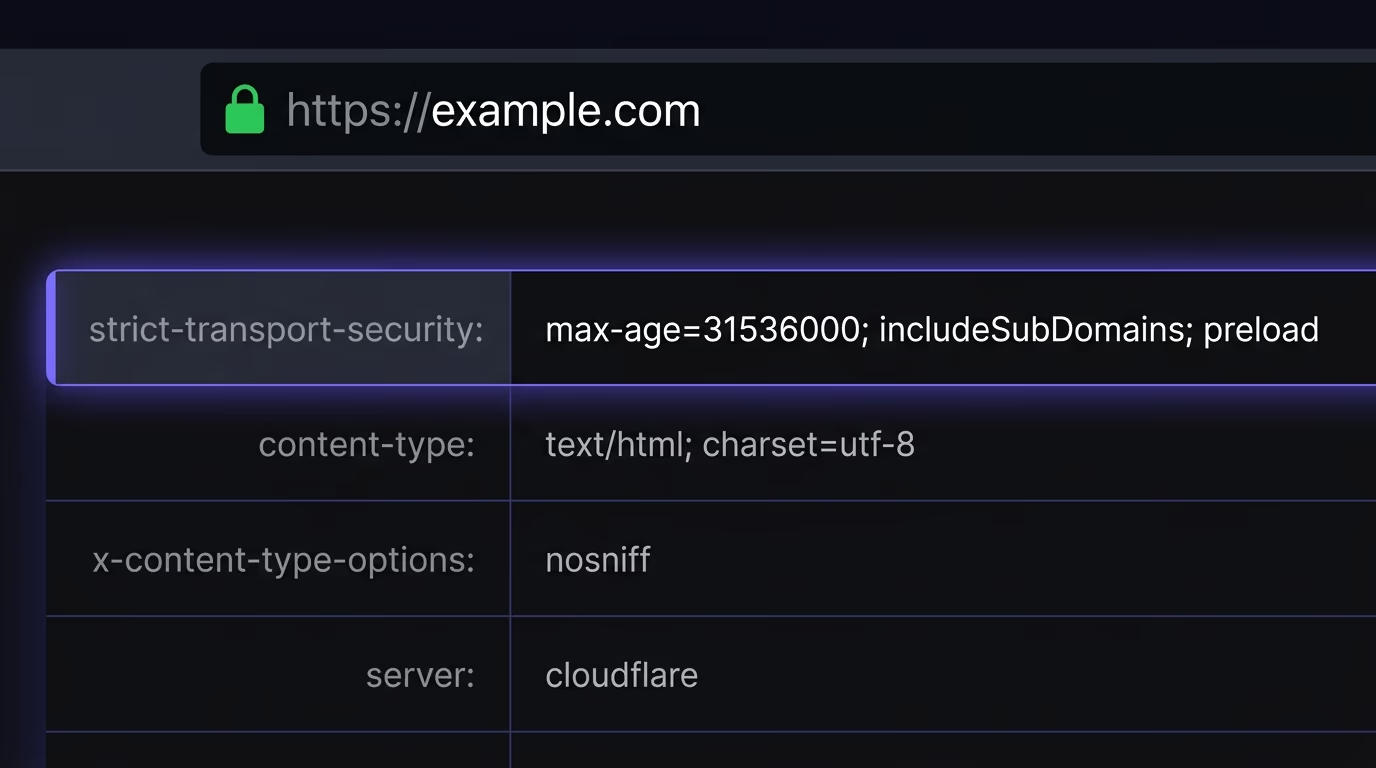
HSTS (HTTP Strict Transport Security) is a response header that tells browsers to always use HTTPS for your domain, even if someone types the URL without the https:// prefix or follows an old HTTP link. The header looks like Strict-Transport-Security: max-age=31536000; includeSubDomains, and without it, the very first request to your site can travel over unencrypted HTTP, which creates a brief window where an attacker on the same network can intercept it. You can check whether your server sends this header by opening DevTools, clicking the document request in the Network tab, and scanning the response headers. If HSTS isn’t there, adding it is typically one line in your hosting config or a single toggle in your Cloudflare dashboard.
Which security headers does your site need?
This is the biggest gap in every other website security checklist published online. They mention HSTS and stop there, but five additional response headers belong on every site, and each one prevents a specific, well-documented class of attack. Our guide to the six security headers that matter walks through each one with its recommended value and the exact config to add it on Vercel, Nginx, Next.js, and Cloudflare.
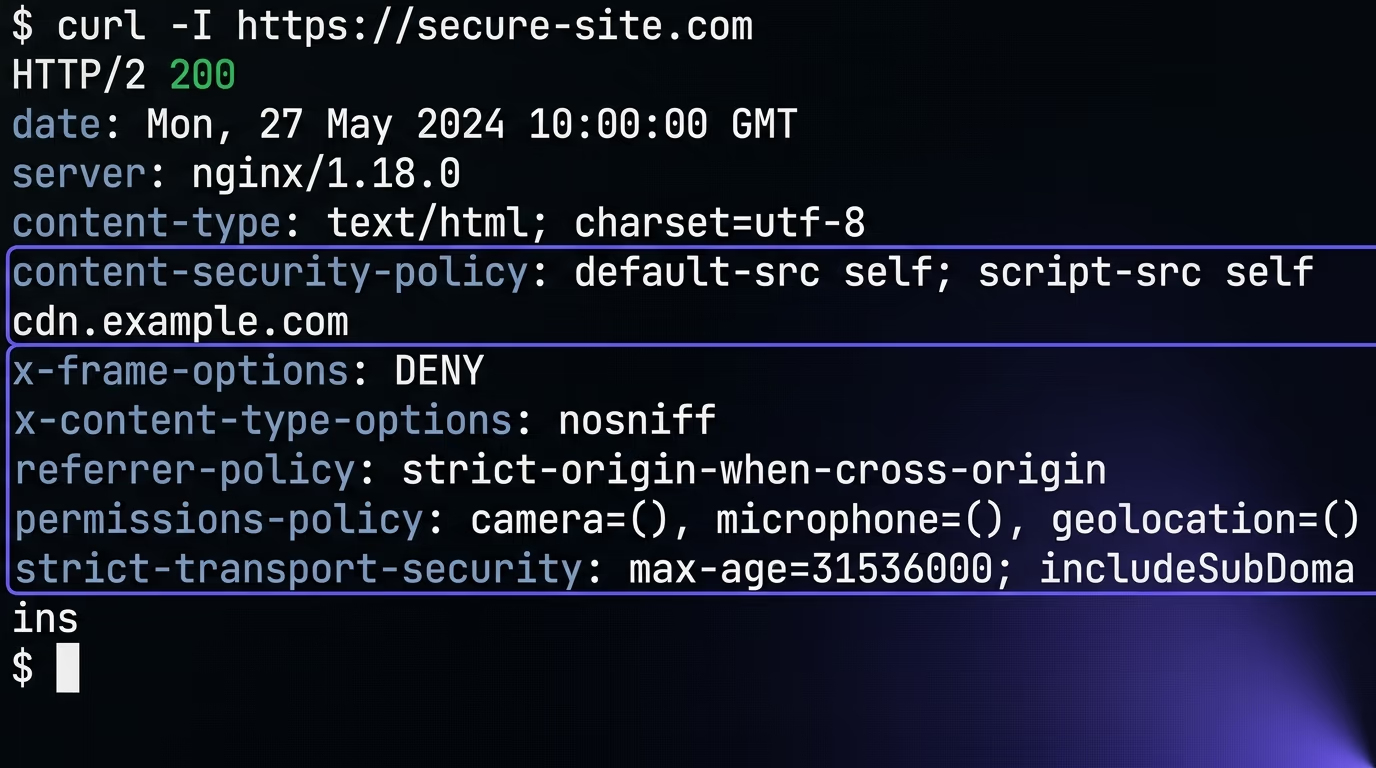
Content-Security-Policy (CSP) is the most powerful header after HSTS. It defines which domains can serve scripts, styles, images, and fonts on your pages, so even if an attacker injects a script tag through an XSS vulnerability, the browser refuses to run it because the source isn’t on the allowed list. A strict policy tends to break things at first, which is why you should test with Content-Security-Policy-Report-Only before switching to enforcement, and widen the allowed sources only for origins you genuinely need.
X-Frame-Options (or the frame-ancestors directive in CSP) prevents other sites from loading your pages inside an iframe, which is how clickjacking attacks work. Set it to DENY unless you specifically need your pages embedded elsewhere. X-Content-Type-Options set to nosniff stops browsers from guessing a file’s MIME type, which prevents an attacker from uploading a disguised file and having the browser execute it as JavaScript.
Referrer-Policy controls how much of the current page URL gets shared when someone clicks a link to another site. The value strict-origin-when-cross-origin keeps your internal paths private while still sending the domain for analytics. Permissions-Policy disables browser APIs your site doesn’t use, like the camera, microphone, and geolocation, so a compromised third-party script can’t silently activate them. You can test all of these headers at once by running curl -I https://yoursite.com or by using Amabrik’s security scan, which checks every header automatically and explains what each one does in plain language.
Are API keys or secrets exposed in your code?
This is the single most common security failure in sites built with AI tools, and it’s the one with the most immediate real-world consequences. When a coding assistant needs an API key to make a feature work, it puts that key wherever is simplest, which is often a client-side environment variable or a hardcoded string right inside the JavaScript bundle. The feature works, the demo looks great, and the key is readable by anyone who opens view-source in their browser.
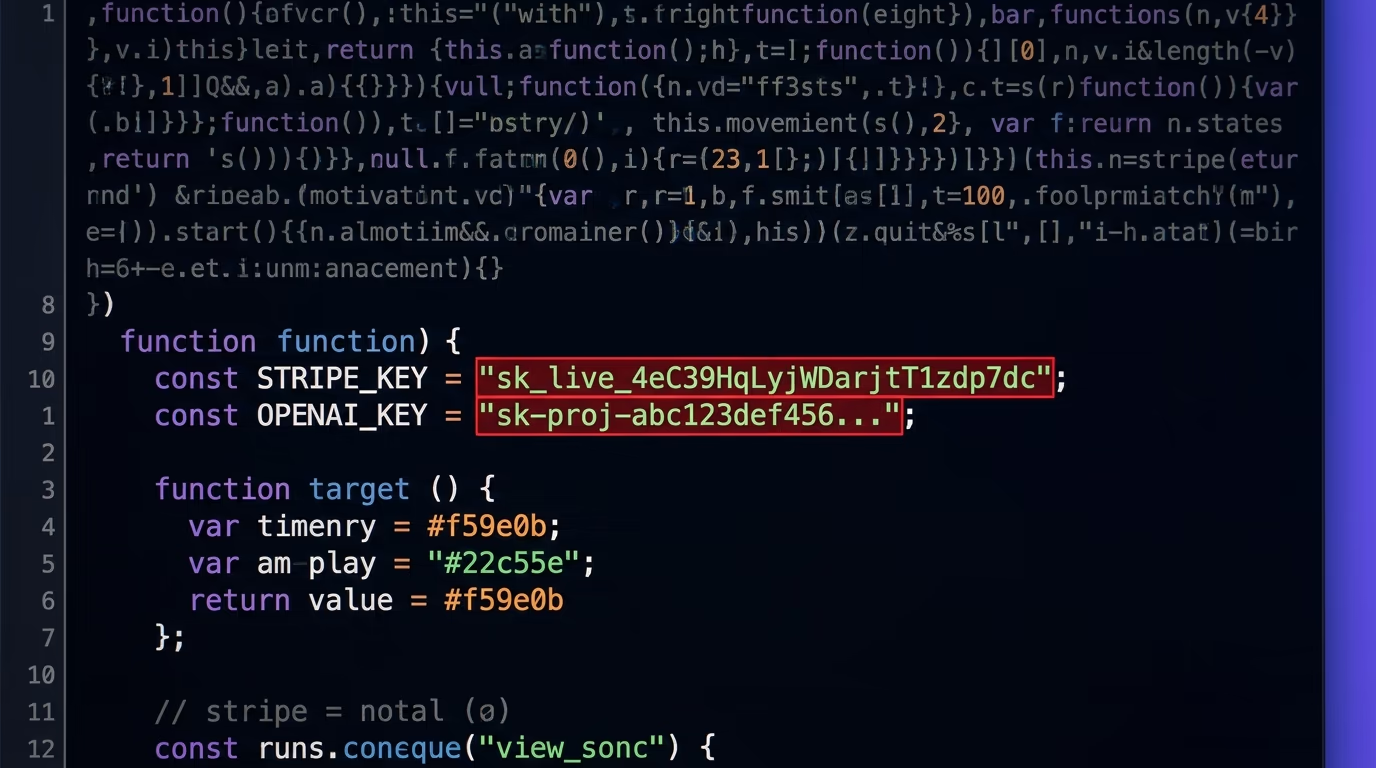
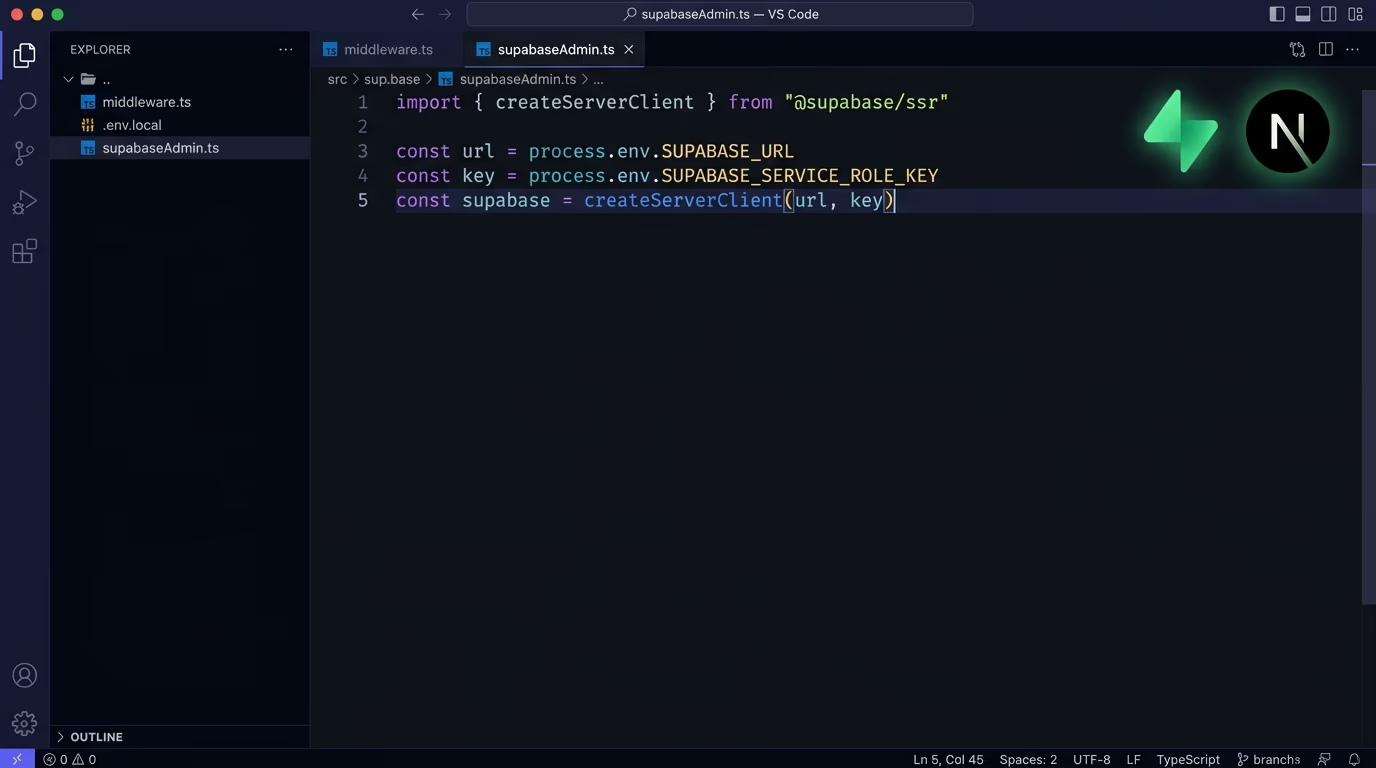
In Next.js specifically, any variable prefixed with NEXT_PUBLIC_ gets compiled into the client-side JavaScript and shipped to every visitor who loads the page. AI coding tools routinely put secret keys there because it’s the fastest way to make them accessible in both server and client code, and nothing in the build process warns that it’s the wrong place for anything private. The check is simple: open your deployed site, view the page source, and search for patterns like sk_, pk_live_, AKIA, ghp_, or any string that looks like a long random token.
Your .env file is an even bigger risk. Try loading https://yoursite.com/.env in your browser right now. If it returns your environment variables instead of a 404, every API key, database connection string, and application secret in that file is public. The same goes for .git/config: if it’s accessible at your domain, an attacker can reconstruct your entire repository history, including secrets that were committed once, deleted, and forgotten about. Most frameworks block requests to dotfiles by default, but certain deployment configurations skip that protection, especially when the build output gets served as plain static files. If you built your app with an AI coding tool, this check should be the first one you run. Files like these also get reached through a directory traversal attack, where a crafted path with ../ sequences climbs out of the folder the app meant to serve and reads whatever sits above it.
Is your database locked down?
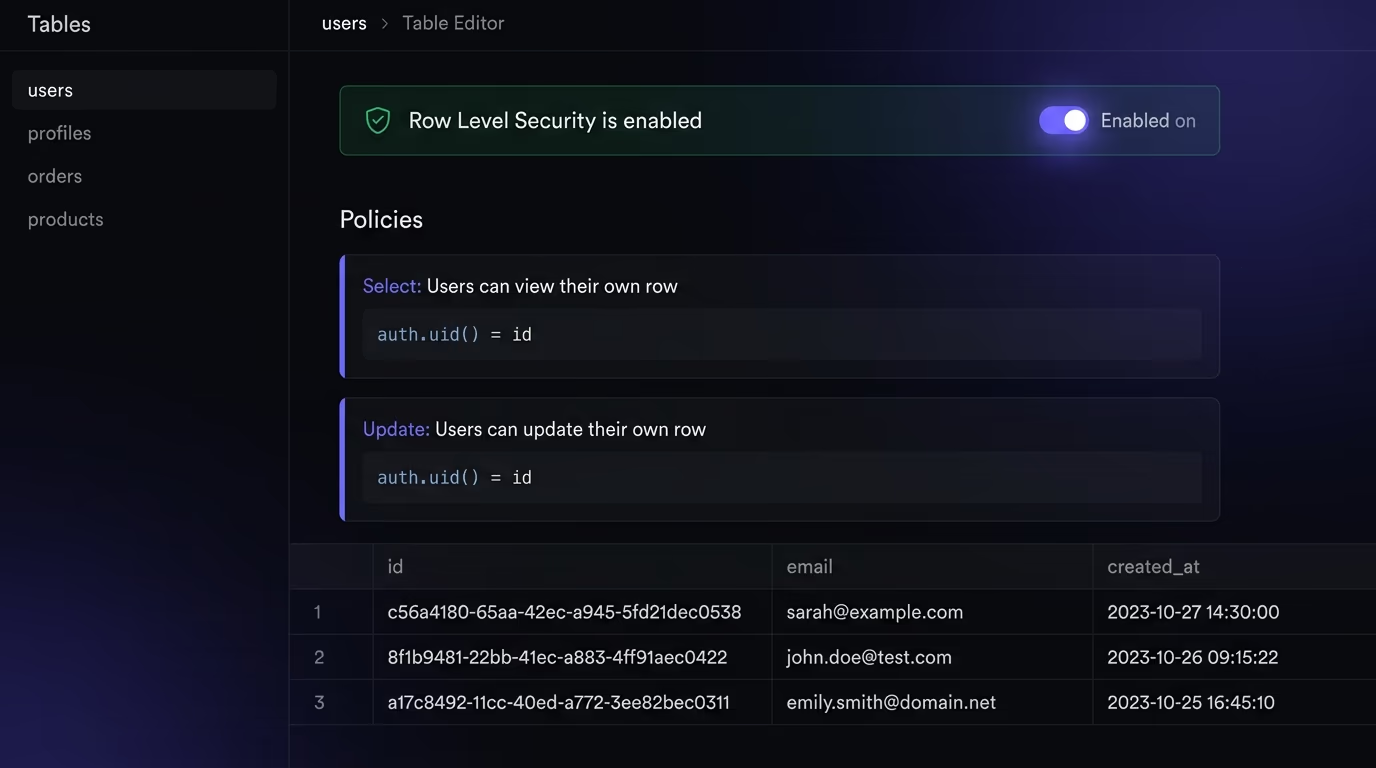
The most dangerous database vulnerability in modern web apps isn’t SQL injection. It’s a database that grants read access to everyone because the access control rules were never switched on. Supabase uses PostgreSQL’s row-level security (RLS) to control who can read, insert, update, or delete each row in each table. The default state is off, which means every row in every table is accessible to anyone who has the project’s public anon key, a key that sits in your client-side code by design.
Firebase has the same problem in a different shape. Its security rules ship in a test mode that allows unrestricted reads and writes for every collection, and the Firebase console shows a yellow warning banner about it, but the app works fine with test mode enabled, so the banner gets closed and forgotten. The transition from “weekend prototype” to “live product with real user data” happens gradually, and the security rules don’t update themselves along the way.
The check for Supabase is concrete: open the Table Editor in your project dashboard, click each table, and confirm that RLS is enabled with at least one policy gating access on auth.uid(). For Firebase, open the Firestore rules editor and search for allow read, write: if true. If you find that line, it means any visitor can read and modify any document in that collection. A detailed walkthrough of locking down a Next.js and Supabase stack covers the RLS setup, the service_role key mistake, and the other common access-control gaps that AI tools create.
Are your forms protected against injection?
Form injection shows up in two forms that matter for most websites. SQL injection happens when user input flows directly into a database query without parameterization, which lets a carefully crafted input string alter the query logic and extract, modify, or delete data. Cross-site scripting (XSS) happens when user input gets rendered back to other visitors without proper sanitization, so an attacker submits a form containing a script tag that runs in every subsequent viewer’s browser.
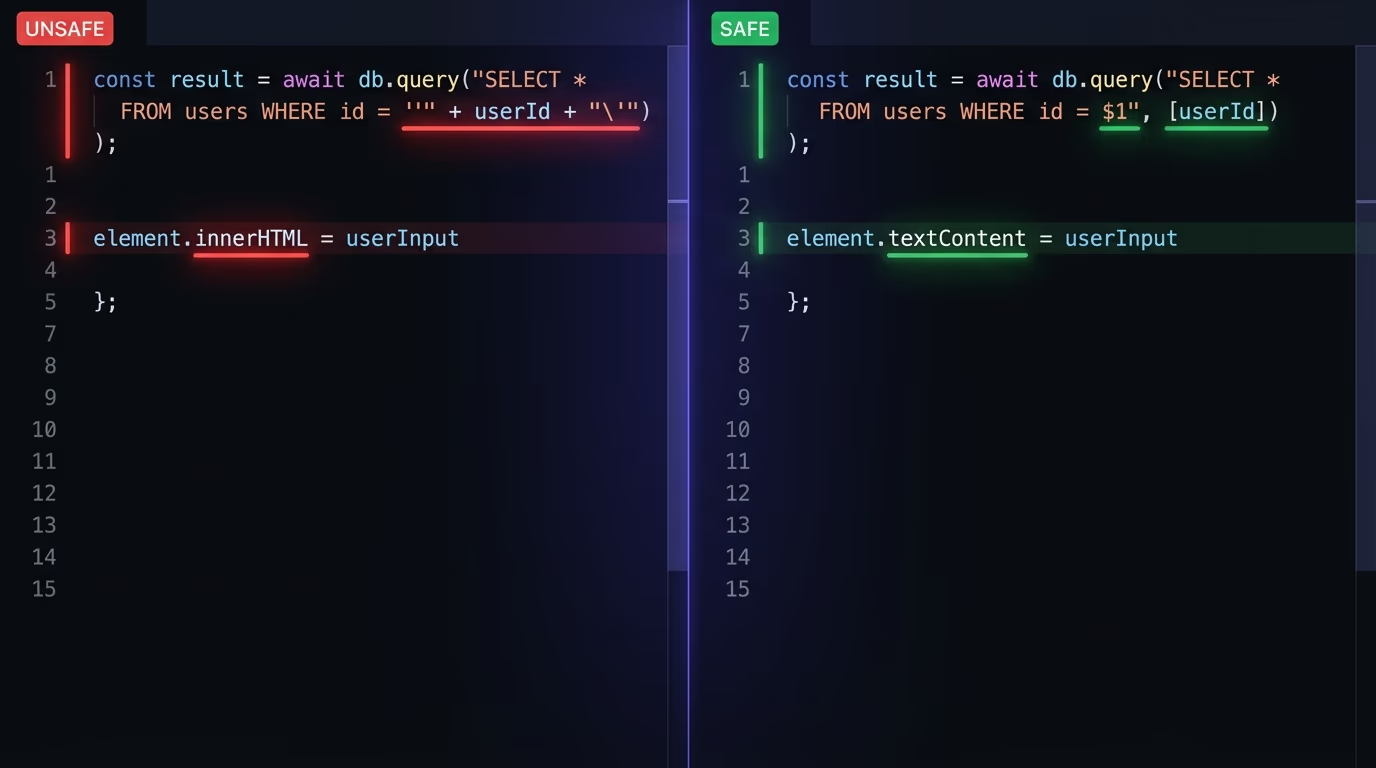
Both problems have well-established fixes that modern frameworks apply by default. For SQL injection, the solution is parameterized queries or an ORM that handles parameterization automatically. Drizzle, Prisma, and SQLAlchemy all do this, so if you’re using one of them, your queries are safe unless you’ve written raw SQL somewhere that bypasses the ORM. For XSS, the fix is output encoding, which means escaping all user-generated content before rendering it, plus a Content-Security-Policy header that blocks inline scripts as a second layer of defense.
The third form-level risk is CSRF (cross-site request forgery), where a page on another domain tricks your visitor’s browser into submitting a request to your site using their existing session cookies. Setting the SameSite cookie attribute to Strict or Lax prevents most CSRF attacks by keeping the cookie from traveling with cross-origin requests. Modern frameworks handle these protections by default, but AI-generated code sometimes skips them by writing raw queries, using dangerouslySetInnerHTML, or setting cookies without the right attributes, which is why a manual check still matters even with a good framework.
Can someone spoof your email domain?
Email authentication is the check that virtually no website security checklist bothers to mention, and it’s one of the simplest vulnerabilities to exploit when it’s missing. If your domain’s DNS has no SPF, DKIM, or DMARC records, anyone on the internet can send email that appears to come from your domain, and most recipient inboxes won’t flag it as suspicious. This is exactly how phishing attacks successfully impersonate legitimate businesses.
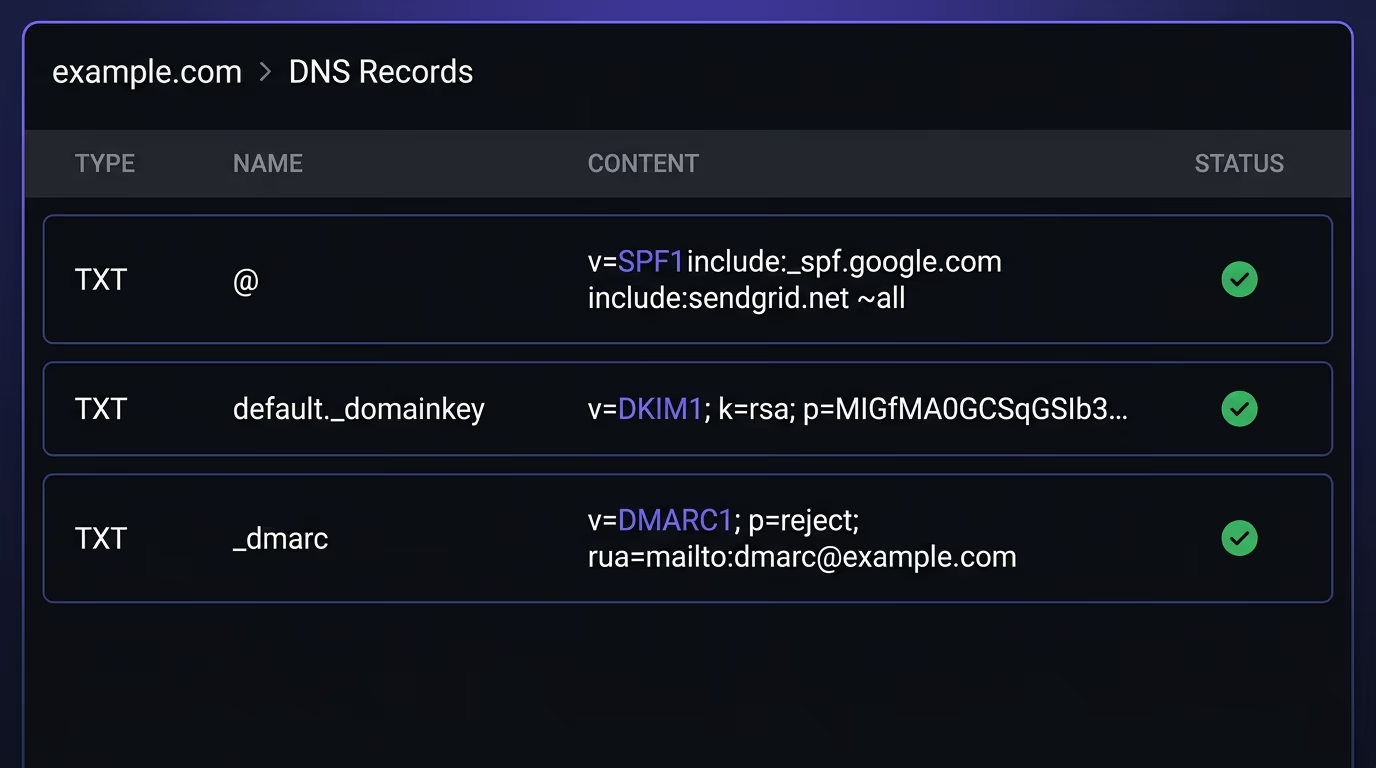
SPF (Sender Policy Framework) is a DNS TXT record listing which mail servers are authorized to send email on behalf of your domain. When a receiving server gets a message claiming to be from your domain, it checks the SPF record and can reject the message if the sending server isn’t on the list. DKIM (DomainKeys Identified Mail) adds a cryptographic signature to each outgoing message so the receiver can verify it wasn’t altered in transit. Together, they prove both who sent the email and that the content arrived intact.
DMARC is the policy layer that ties everything together. It instructs receiving servers on what to do when an incoming message fails SPF or DKIM checks: take no action, quarantine it, or reject it outright. A DMARC record set to p=reject is the strongest configuration, because it tells every receiving server in the world to drop spoofed emails entirely so they never reach anyone’s inbox. You can check your domain’s email authentication records by running dig TXT yourdomain.com or using MXToolbox. If you send transactional email through Resend, Postmark, or SendGrid, their setup guides walk through adding all three records, and the whole process takes roughly ten minutes. For a step-by-step walkthrough of each record and how to move a DMARC policy to p=reject safely, see the guide to SPF, DKIM, and DMARC.
Are your cookies configured safely?
Cookies carry session tokens, authentication state, and consent preferences. A single misconfigured cookie can expose all of that to an attacker, and four specific attributes determine whether each cookie is safe or exploitable.
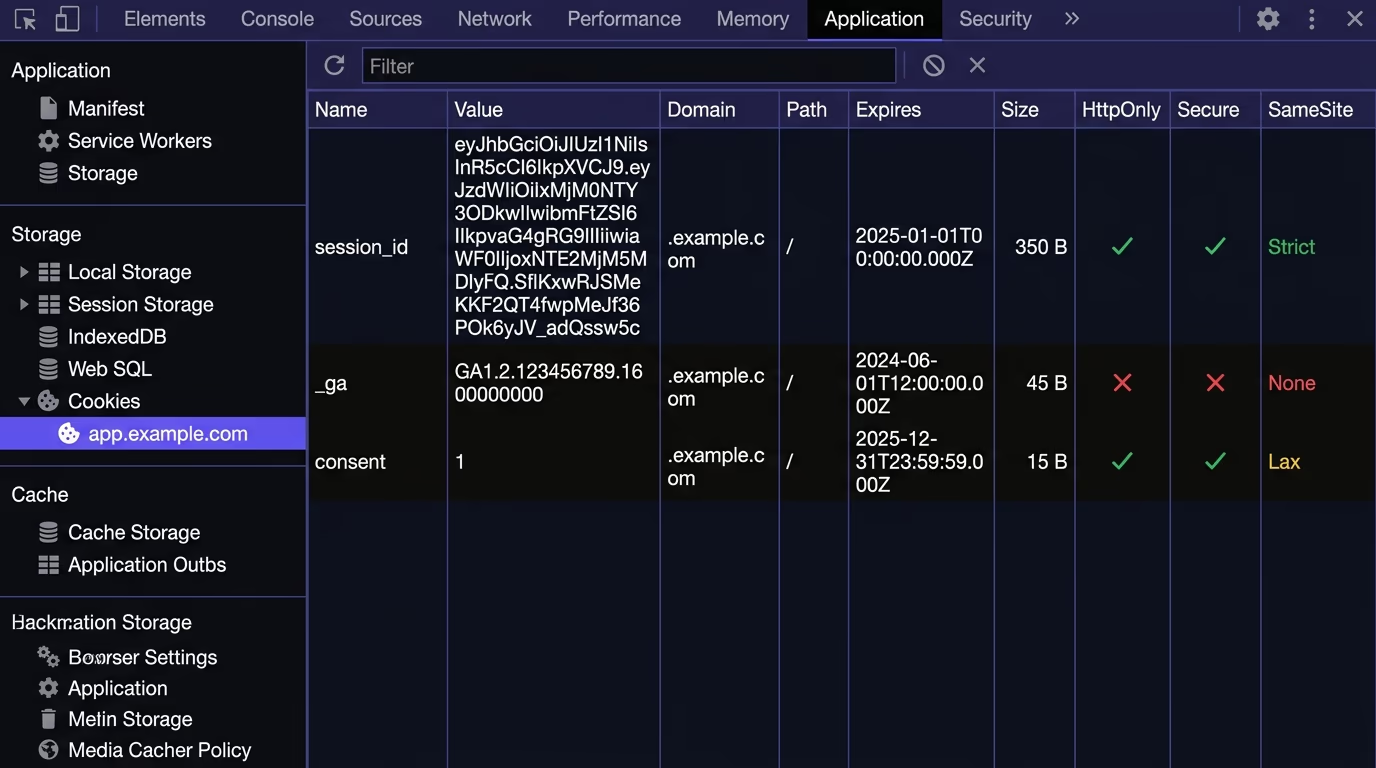
The Secure flag ensures the cookie only travels over HTTPS, so it can’t be intercepted on an unencrypted network. HttpOnly prevents JavaScript from reading the cookie’s value, which stops an XSS attack from stealing session tokens even if the attacker manages to inject and execute a script on your page. SameSite controls whether the cookie gets included in requests that originate from other domains: setting it to Strict or Lax blocks most CSRF attacks by keeping the cookie inside your own site’s requests.
The fourth thing to check is cookie scope. A cookie set on .yourdomain.com with the leading dot is shared across every subdomain, which is convenient for sharing authentication between app.yourdomain.com and www.yourdomain.com but risky if any subdomain runs untrusted code or gets compromised independently. Keep the domain scope as tight as your architecture requires, and set an expiration so sessions don’t stay valid indefinitely. Your cookie consent implementation should also confirm that analytics and advertising cookies aren’t set until the visitor actively consents, which is a legal requirement under GDPR, ePrivacy, CCPA, and several other privacy frameworks rather than an optional best practice.
Are your dependencies up to date?
Every npm package, Python library, or Ruby gem your application depends on is code you didn’t write and didn’t review. Any of those packages can contain a known vulnerability that attackers actively scan for. The Log4Shell vulnerability in late 2021 affected millions of applications through a single logging library buried deep in their dependency trees, and similar discoveries happen on a regular basis.
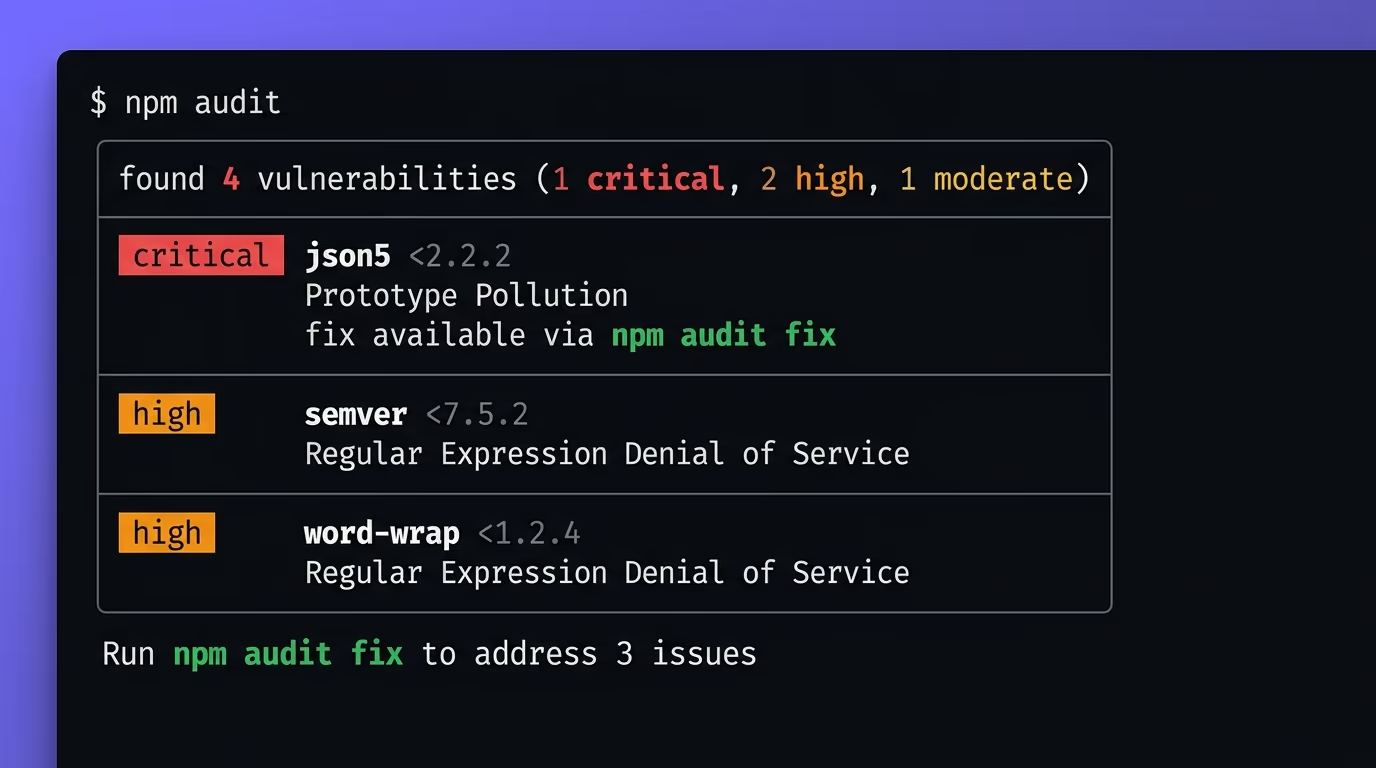
The check itself is simple: run npm audit (Node.js), pip-audit (Python), or bundle-audit (Ruby) and review what comes back. Prioritize critical and high-severity findings first, particularly in production dependencies rather than development-only tools that never reach your deployed application. Most package ecosystems also offer automated dependency monitoring through Dependabot, Renovate, or Snyk, which open pull requests as soon as a patched version becomes available.
What makes dependency security tricky is transitive dependencies: packages that your direct dependencies pull in, that you never explicitly chose or installed. A vulnerability in a transitive dependency is just as dangerous as one in a package listed in your package.json, but it’s harder to notice because you never decided to use it. Audit tools flag these automatically, which is why running them on a regular schedule matters more than manually reviewing your direct dependency list. If you haven’t run an audit on your project in the past month, there’s a strong chance something has been flagged since the last time you checked.
How do you scan your site for all of this?
Going through each check by hand is thorough but slow, and it’s the kind of work that gets skipped the moment a deadline approaches. A missing header, an exposed .env file, or a cookie without the right flags can sit in production for months when nobody is actively looking for it.
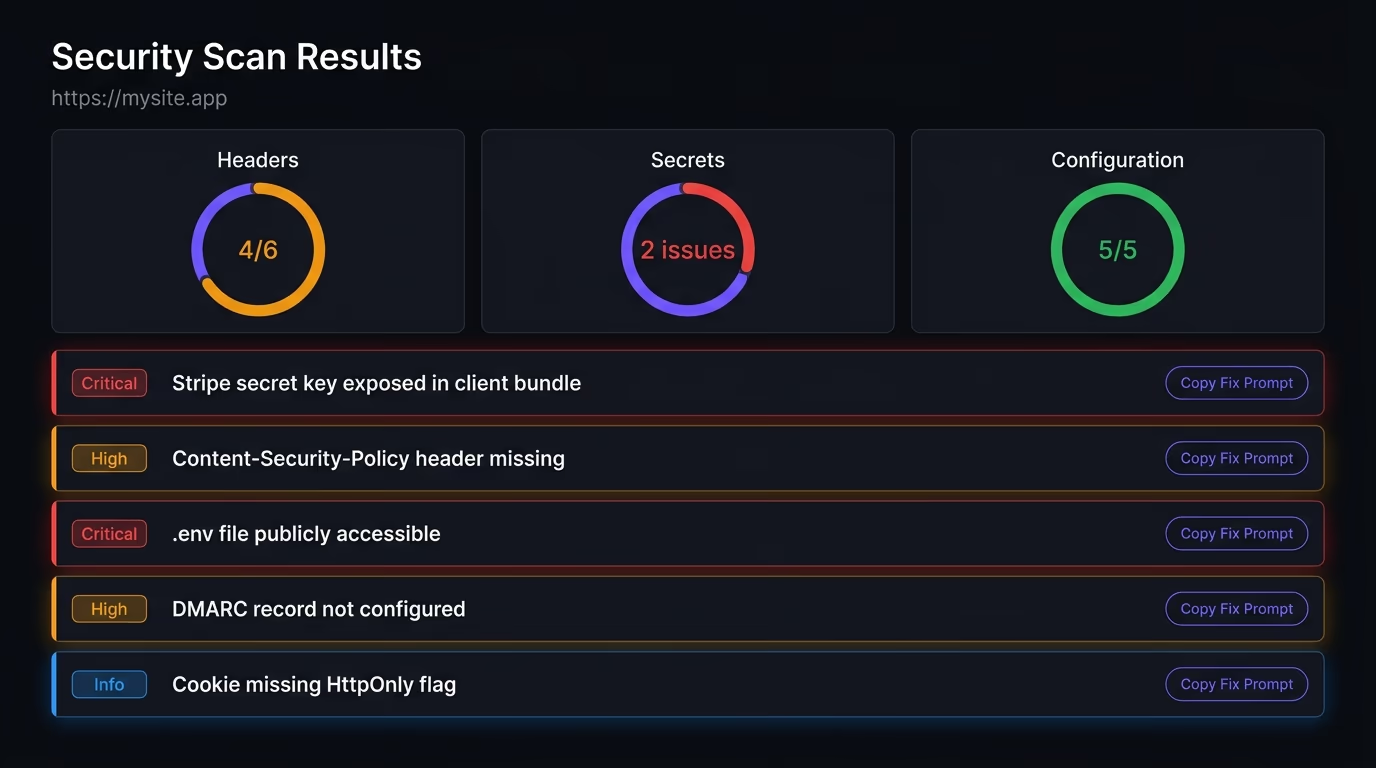
Amabrik’s security scan automates every check in this article. It crawls your live production URL and flags leaked API keys (Stripe, AWS, OpenAI, GitHub, and dozens of other patterns), exposed .env and .git files, every missing security header, insecure cookie configurations, SPF and DMARC gaps, and databases with open access rules. Each finding includes a severity level, a plain-English explanation of the risk, and a copy-paste prompt you can hand to your AI coding tool or paste into ChatGPT or Claude to get the exact fix for your specific stack.
Running the scan against your production URL matters because many issues only exist in the deployed environment. A header that works in local development might be missing from your Vercel or Netlify deployment. An .env file that’s safely gitignored on your machine might have been committed and pushed by a teammate months ago. The scan checks what’s actually live and reachable, not what your source code says should be there. You can try the free security scanner right now to see how your site stacks up against this checklist in under a minute.
A useful website security checklist goes beyond SSL certificates. It should cover HTTPS with HSTS enforcement, all six critical security headers (CSP, X-Frame-Options, X-Content-Type-Options, Referrer-Policy, Permissions-Policy, Strict-Transport-Security), API key exposure in client code and .env files, database access rules like Supabase RLS or Firebase security rules, form injection protection, email authentication records (SPF, DKIM, DMARC), cookie security flags, and dependency updates.
Run the full checklist before every launch and after every significant code change. Beyond that, a monthly automated scan catches issues that creep in from dependency updates, configuration drift, or new third-party scripts that introduce mixed content or insecure requests.
An automated scan catches the common surface-level issues that account for most real breaches: leaked keys, missing headers, exposed files, and insecure cookies. A penetration test goes deeper into business logic, authentication flows, and custom code paths. For most websites, a scan covers the vast majority of risk. Penetration tests make more sense for applications that handle sensitive financial or health data.
A static site still needs most of this checklist, because it can still leak API keys in bundled JavaScript, serve insecure cookies from analytics or comment systems, miss security headers entirely, and have SPF/DKIM/DMARC gaps on its email domain. The database and form injection checks may not apply, but the majority of the other items still do.
Open your deployed site in a browser, view the page source, and search for common key prefixes like sk_, pk_live_, AKIA, ghp_, or any long alphanumeric string that looks like a token. Then try loading your-domain.com/.env directly in the browser. If either search returns something, you have an active leak that needs fixing immediately. A security scanner automates both of these checks and tests for dozens of additional patterns.